
AI agents for business are software workers that plan, decide, and act across your tools with human oversight. In 2027, a focused pilot costs roughly $15,000–$40,000. The best first wins are customer support, sales operations, and document-heavy back-office work. Start with one measurable process, fix your data first, and scale only after you prove ROI.
Every few months, a new tool promises to run your company on autopilot. Most don’t deliver. AI agents are different, but only when you set them up properly. Done well, they take real work off your team’s plate. Done badly, they automate your mess faster. This guide shows what AI agents for business actually are, what they cost, where they pay off first, and how to roll them out without burning budget.
What Are AI Agents for Business, and How Are They Different From Chatbots?
An AI agent is software that pursues a goal instead of just answering a prompt. Deloitte describes AI agents as systems that understand context, plan workflows, connect to tools and data, and take action. A basic chatbot answers a question. An agent can answer it, check your CRM, issue a refund, and update the ticket.
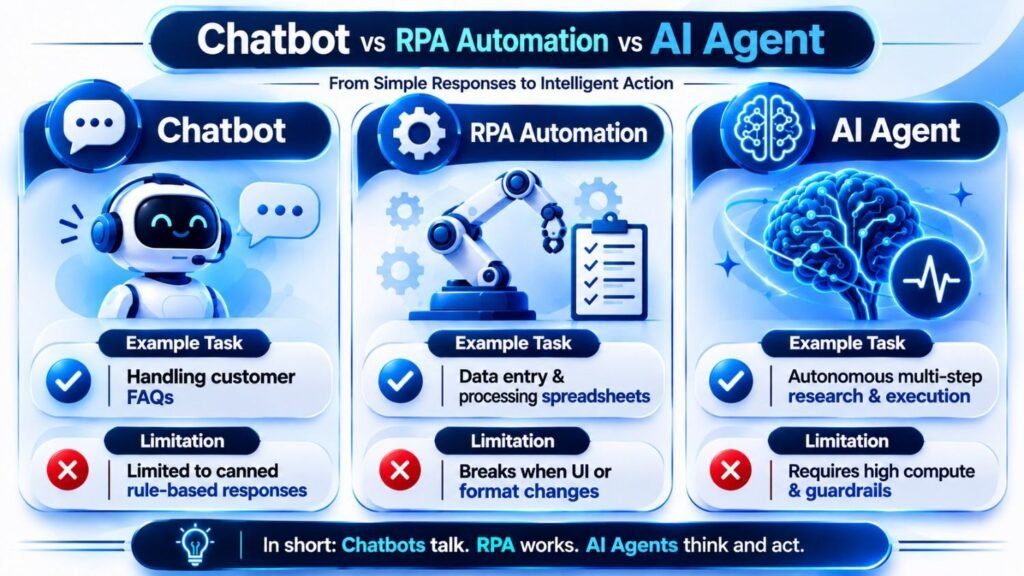
Here is the simplest way to tell them apart:
- Chatbots respond. They follow scripts or answer from a knowledge base.
- Automation (RPA) repeats fixed steps. It breaks when the process changes.
- Autonomous AI agents decide the next step based on context, then act.
[
Conversational AI agents for businesses sit in the middle. They talk to customers in natural language and also trigger actions behind the scenes. If you want the foundation first, see our guide on AI-powered chatbot solutions and how to train a chatbot on your own data. Want the automation angle? Read AI workflow automation vs traditional automation.
Why Are AI Agents for Business Growing So Fast Heading Into 2027?
Three reasons: better models, cheaper compute, and heavy pressure to show results.
But adoption and impact are not the same thing. Look at the numbers:
- McKinsey reports that 88 percent of organizations regularly use AI, but only 37 percent report EBIT impact at the enterprise level (September 2026).
- The 2025 IBM Institute for Business Value C-suite study found only 25% of AI initiatives delivered expected ROI. Just 16% scaled enterprise-wide, according to IBM.
- Deloitte’s 2026 State of AI in the Enterprise report, based on 3,235 leaders, says 66% see efficiency gains. Fifty-three percent report better decisions, and 20% are growing revenue, per Deloitte.
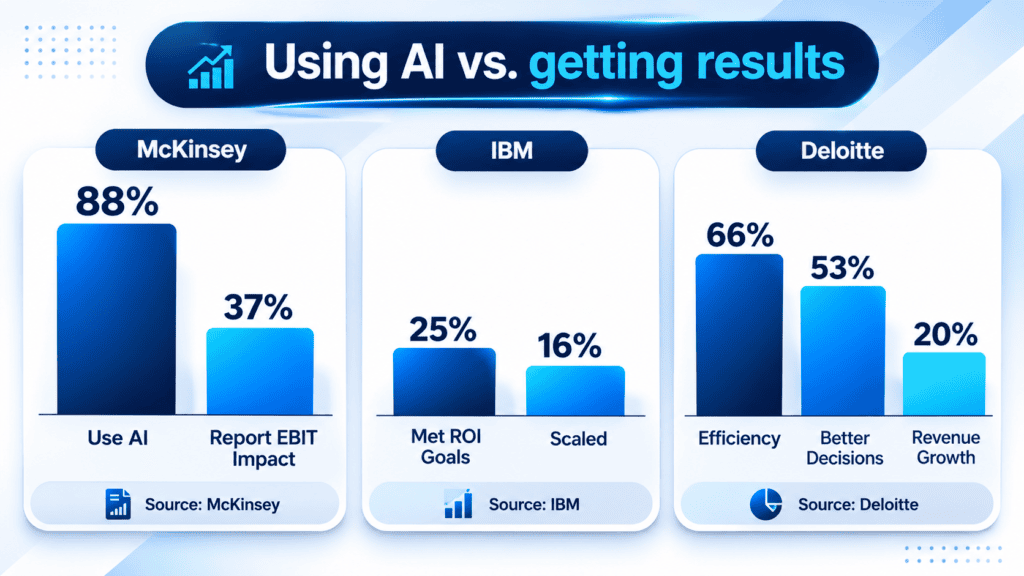
The pattern is clear. Almost everyone is using AI. Far fewer are getting paid for it. That gap is your opportunity. Companies that treat agents as a designed system, not a quick plug-in, pull ahead.
What Are the Best Use Cases for AI Agents in Business?
Start where work is repetitive, rule-heavy, and expensive. Here are seven areas where we see the strongest fit.
1. Customer support (AI Development)
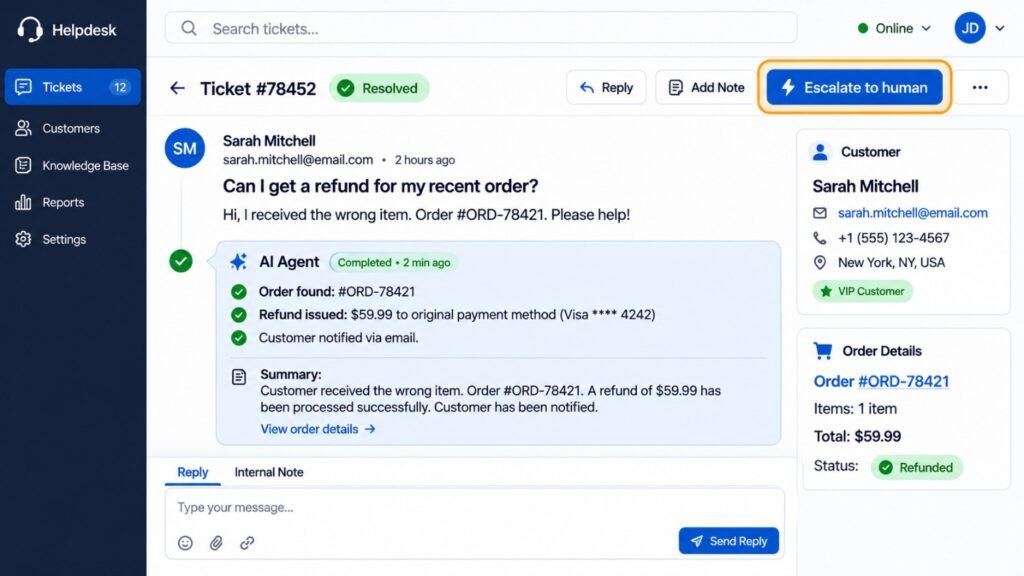
An agent reads the question, pulls order data, and resolves common issues. It hands complex cases to a human with a full summary. Support is often the fastest win because results are easy to measure.
2. Sales and lead qualification (Digital Marketing)
Agents can score inbound leads, enrich contact data, and book meetings. They also draft follow-ups in your brand voice. Your reps spend more time closing and less time sorting.
3. SEO and content operations (SEO)
Agents can run technical audits, cluster keywords, and draft content briefs. Humans still approve everything that goes live. The agent handles the grunt work.
4. Back-office workflows (Custom Software Development)
Think invoice matching, claims intake, and contract review. Agents work best when embedded in your existing systems, which is why custom software often matters more than the model itself.
5. In-app assistants (Mobile App Development)
An agent inside your app can guide onboarding, answer questions, and complete tasks for the user. It turns a static app into a helpful one.

6. Agent-ready interfaces (UI/UX)
People need to see what an agent did and undo it. Good UI/UX design shows actions, confidence levels, and a clear “escalate to human” button.
7. Ongoing engineering capacity (IT Outsourcing)
Agents need monitoring, prompt updates, and integration fixes. An outsourced engineering team can own that upkeep so your in-house staff stays focused.
Pro tip: Pick one use case where you can name the current cost per task. If you can’t measure the “before,” you can’t prove the “after.”
Which Are the Best AI Agents and AI Agent Platforms?
There is no single best AI agent. The right choice depends on your stack, your data, and your team’s skills. Here is a practical comparison of the main AI agent platform categories. Features change fast, so verify current details with each vendor.
| Option | Best For | Strengths | Watch-Outs | Typical Effort |
|---|---|---|---|---|
| Suite-native agents (Microsoft Copilot Studio, Salesforce Agentforce) | Teams already living in that ecosystem | Fast setup, built-in connectors, familiar security | Lock-in, limited customization | Low |
| Cloud agent builders (Google Vertex AI Agent Builder, Amazon Bedrock Agents) | Companies already on that cloud | Scalable, strong model choice | Needs engineering skill | Medium |
| Orchestration layers (IBM watsonx Orchestrate) | Mixed environments with many systems | Vendor-neutral, central governance | Higher platform cost | Medium |
| Open-source frameworks (LangGraph, CrewAI) | Teams wanting full control | Flexible, no license fees | You own security and maintenance | High |
| Custom-built agents | Unique workflows, proprietary data | Fits your process exactly | Highest upfront investment | High |
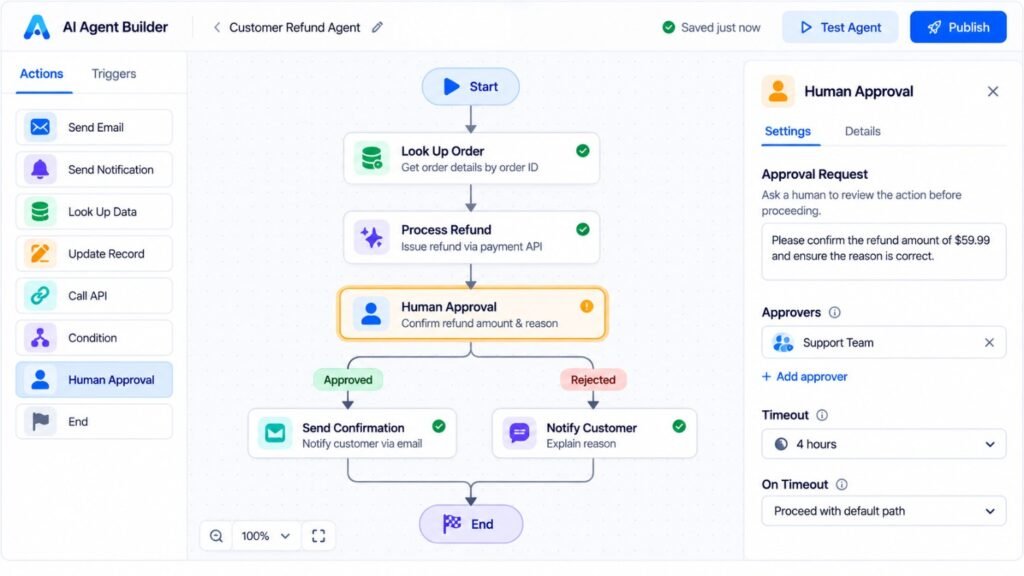
IBM makes a useful point here. Most enterprises run mixed systems, so an open orchestration layer can avoid vendor lock-in and let you swap agents as technology changes.
Should You Build, Buy, or Go Hybrid?
Most mid-sized companies land on hybrid. Buy a platform for the commodity parts. Build custom logic where your process is unique.
Skipping this analysis is costly. McKinsey describes a large medtech company that used an off-the-shelf platform. It couldn’t support several core matching-workflow rules. The team cut the custom work to hit its launch date, leaving an estimated 30 percent of the intended value unrealized.
The lesson: map your workflow rules first. Then choose the tool.
How Much Do AI Agents for Business Cost in 2027?
Costs vary widely. The table below shows typical market ranges for the US. Treat them as planning estimates, not quotes.
| Project Type | Typical Build Cost (USD) | Timeline | Example |
|---|---|---|---|
| Focused pilot | $15,000–$40,000 | 4–8 weeks | FAQ and lead-qualification agent |
| Integrated agent | $40,000–$120,000 | 2–4 months | Support agent connected to CRM and helpdesk |
| Multi-agent workflow | $120,000–$400,000+ | 4–9 months | Claims or order-to-cash automation |
| Ongoing run costs | $500–$10,000+ per month | Continuous | Model usage, hosting, monitoring |
Watch for hidden costs:
- Data cleanup. Often the biggest surprise.
- Integrations. Every legacy system adds time.
- Monitoring and evaluation. Agents need regular testing.
- Change management. Training your people takes real effort.
For a deeper breakdown, read our AI development services cost guide.
Pro tip: Budget 15–20% of the build cost for the first year of monitoring and improvements. Agents drift as your business changes.
How Do You Implement AI Agents for Business, Step by Step?
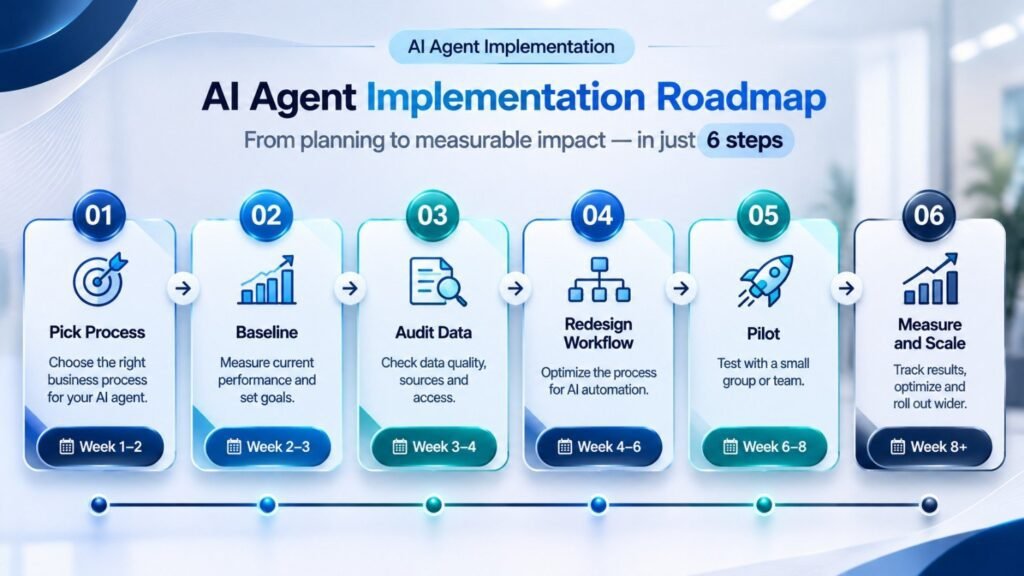
McKinsey recommends a short “blueprint” phase of four to eight weeks before you scale. In its experience, programs built from a blueprint cut overall build time by 30 to 40 percent. Here is a simple version you can follow.
- Pick one process. Choose something repetitive, high-volume, and measurable.
- Set a baseline. Record time, cost, and error rate today. IBM stresses that without a baseline you cannot measure ROI.
- Audit your data. Check that your data is accurate, current, and accessible.
- Redesign the workflow. Decide what the agent can do alone, what needs approval, and what escalates.
- Pilot with guardrails. Start small, with spending limits and human review.
- Measure, then scale. Expand only after the numbers hold for at least one full cycle.
Microsoft’s Cloud Adoption Framework guidance on AI agent business strategy is a helpful planning companion for this stage.
Why Do So Many AI Agent Projects Fail?
Usually it is not the technology. It is the groundwork.
A real story from McKinsey’s research. A global medical technology company built an agentic customer-service solution. It assumed its customer data was clean and integrated. Mid-build, the team found version-control mismatches across its systems of record. Fixing them added four to five weeks of rework. A planning-phase data audit would have caught it.
An illustrative scenario. Picture a regional distributor handling 1,200 support emails a month. Each takes about 11 minutes. After an eight-week pilot, an agent resolves 55% of them on its own. That is 660 emails and roughly 121 hours saved monthly. At a loaded labor cost near $28 an hour, that is about $3,400 a month. The pilot pays back in under a year, and staff move to complex accounts. (This is a composite example for illustration, not a client result.)
The most common mistakes:
- Automating a broken process. Agents amplify flaws instead of fixing them.
- Treating data as a later problem. It always surfaces on day one of production.
- Skipping change management. An unused agent delivers zero value.
- Weak governance. Committees that only review dashboards cannot stop a failing project.
What Are the Pros and Cons of AI Agents for Business?
| Pros | Cons |
|---|---|
| Handle high-volume tasks around the clock | Can produce confident but wrong answers |
| Reduce cost per task and response time | Upfront data and integration work |
| Scale without adding headcount | Need ongoing monitoring and updates |
| Free staff for higher-value work | Create new security and compliance risks |
| Improve consistency across processes | Adoption can stall without training |
How Do You Measure the ROI of AI Agents?
IBM suggests three lenses:
- Speed to outcome. How much faster is the process?
- Cost to serve. How much cheaper is each outcome?
- New capabilities. What can you do now that you couldn’t before?
The first two are easy to track. The third is harder but often the most valuable.
IBM also advises starting with cost savings, because they are faster to prove. Use that win to fund bigger bets.
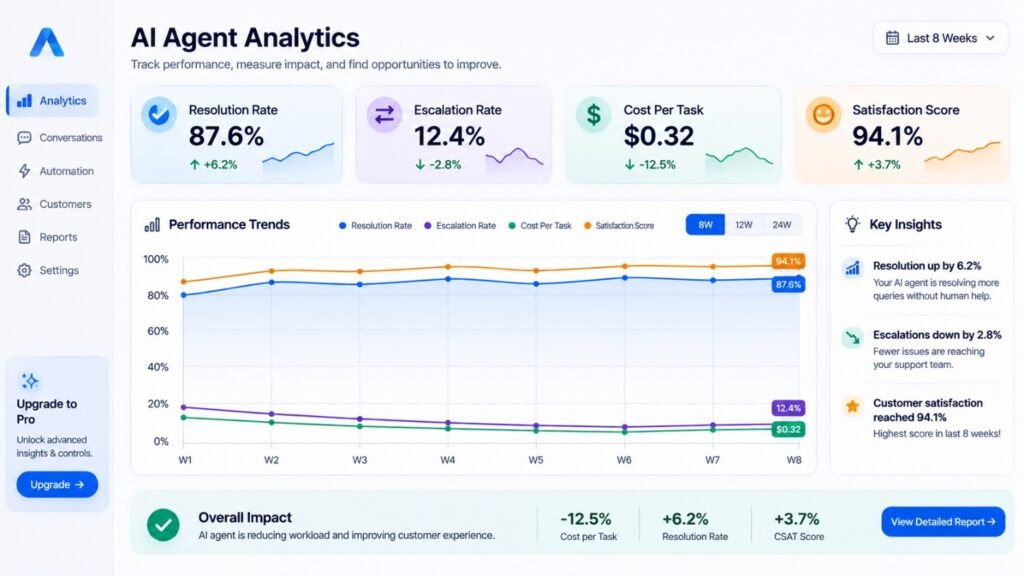
Track these metrics from day one: resolution rate, escalation rate, error rate, cost per task, and user satisfaction.
What Are the Security and Governance Risks?
Agents have access to data and tools. That creates new exposure.Deloitte highlights three risk areas: accuracy (hallucinations), security (including prompt injection), and regulation. Without proper observability, autonomous AI agents can compound errors at scale.
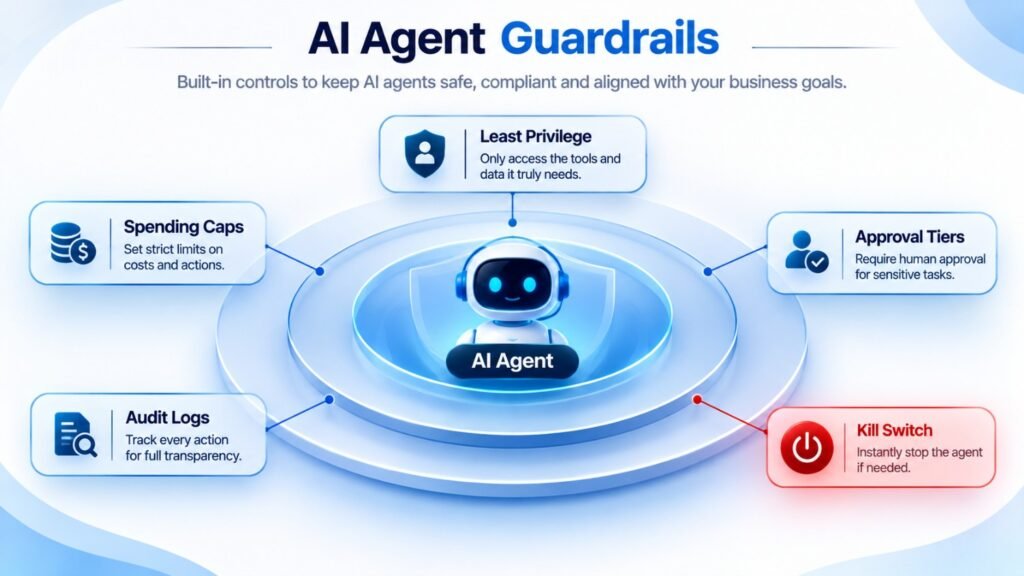
A simple control framework:
- Least privilege. Give the agent only the access it needs.
- Spending caps. Set limits on actions that cost money.
- Approval tiers. Require human sign-off for high-impact actions.
- Audit logs. Record every decision and action.
- A kill switch. You should be able to pause an agent in seconds.
What Will Change for AI Agents in 2027?
Nobody can predict this precisely, but several shifts look likely based on current research and market direction.
- The experimentation phase is ending. McKinsey says CFOs and boards now expect measurable returns, not pilots for their own sake.
- Agents will work with other agents. Deloitte’s research points toward complex, agent-orchestrated workflows and higher autonomy.
- Governance becomes a buying factor. Expect buyers to ask about observability and audit trails before they ask about features.
- “Agent-washing” will spread. Some vendors will label basic automation as agents. Ask to see the agent plan, use tools, and recover from errors.
- People become agent supervisors. New roles will focus on reviewing, tuning, and escalating agent work.
Best for the USA: What US Businesses Should Consider
The US has no single federal AI law. Instead, you face a patchwork of state rules and sector regulations. Always confirm current requirements with legal counsel, because this area is changing quickly.
Regulations to watch:
- State laws. Colorado, California, and Utah have all moved on AI rules, covering areas like high-risk decisions, automated decision-making, and AI disclosure. Check each law’s current status and effective dates.
- Hiring tools. New York City’s Local Law 144 requires bias audits for automated employment decision tools.
- Voice agents. The FCC has ruled that AI-generated voices count as “artificial” under the TCPA. Outbound AI calling needs proper consent.
- Industry rules. HIPAA (healthcare), GLBA (financial services), and SOX apply to agents handling regulated data.
- Consumer protection. The FTC pursues deceptive AI claims, so avoid overstating what your agent does.
- Frameworks. The NIST AI Risk Management Framework is a solid, widely used baseline.

Pricing and labor context: US support and operations labor is expensive. A fully loaded support employee can cost several thousand dollars a month, which is why the payback math often works faster here than elsewhere. All costs in this guide are in USD.
Local challenges:
- Customer expectations. US customers expect instant, accurate answers and an easy path to a human.
- Disclosure. Tell people when they are talking to an AI.
- Time zones. If you use an offshore team, require overlap with US business hours.
- Data residency. Some US contracts require data to stay in-country. Confirm hosting early.
Where it works best in the US: healthcare practices (scheduling and intake), e-commerce brands (returns and support), professional services (document review), and field-service companies (dispatch and quoting). In each, start with one workflow and expand.
Will AI agents replace my employees?
In most cases, they change roles instead of removing them. The agent handles routine volume. Your people handle exceptions, relationships, and oversight. Plan for retraining, not just headcount math.
How long until I see ROI?
It depends on the use case. Simple support or lead-qualification agents can show results within a quarter. Complex, multi-system workflows take longer. IBM recommends starting with cost-saving use cases because they prove value fastest.
How is an AI agent different from RPA or a chatbot?
RPA follows fixed rules and breaks when inputs change. Chatbots answer questions. An agent plans, chooses tools, and acts toward a goal, adjusting as it goes.
Can a small business afford AI agents?
Yes. Start with a narrow pilot in the $15,000–$40,000 range, or use a platform subscription for a single workflow. Small teams often move faster because they have fewer systems to untangle.
How do I stop an agent from making expensive mistakes?
Use permission tiers. Let the agent act alone on low-risk tasks, require approval for medium-risk ones, and block high-risk actions entirely. Add spending caps and a pause button.
Is it safe to give conversational AI agents access to customer data?
It can be, with the right controls. Limit access to the fields the agent needs, mask sensitive data, log every action, and test for prompt injection before launch.
How can I tell if a vendor’s “agent” is real?
Ask for a live demo of a multi-step task. A real agent plans steps, uses tools, handles an unexpected error, and explains what it did. If it only follows a fixed script, it is automation with a new label.
onclusion
AI agents for business are no longer a science project. They are practical, but they reward preparation.
Start small. Choose one measurable process. Audit your data. Set clear guardrails. Prove the numbers, then scale.
The companies winning in 2027 won’t be the ones that deployed agents first. They’ll be the ones that redesigned their work around them.
Ready to grow your business with custom AI, SEO, web development, or digital marketing? 👇