
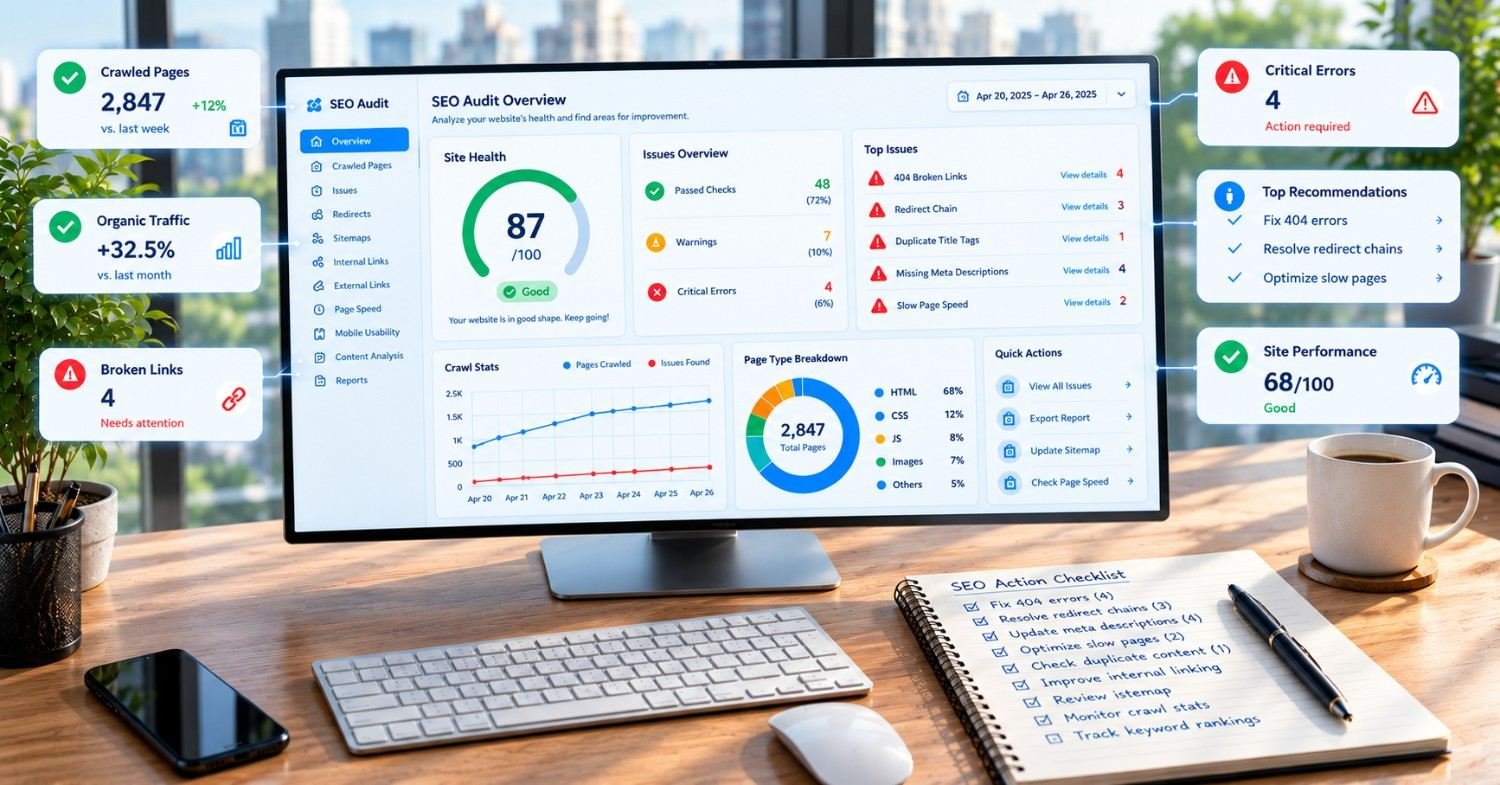
A technical SEO audit checklist helps you find crawl, speed, indexing, and structure problems before they cost you traffic. This guide covers 15 critical issues, the best tools, realistic costs, and a ready-to-use template. Fix the first five and you’ll often see gains within weeks, not months.
You publish good content. You build links. You wait.
Traffic stays flat. Leads dry up. Nobody can say why.
Often the culprit is not your content. It’s your site’s plumbing.
A solid technical SEO audit checklist exposes what search engines and AI crawlers actually see. In this guide, you’ll get 15 specific issues, how to find each one, and how to fix it.
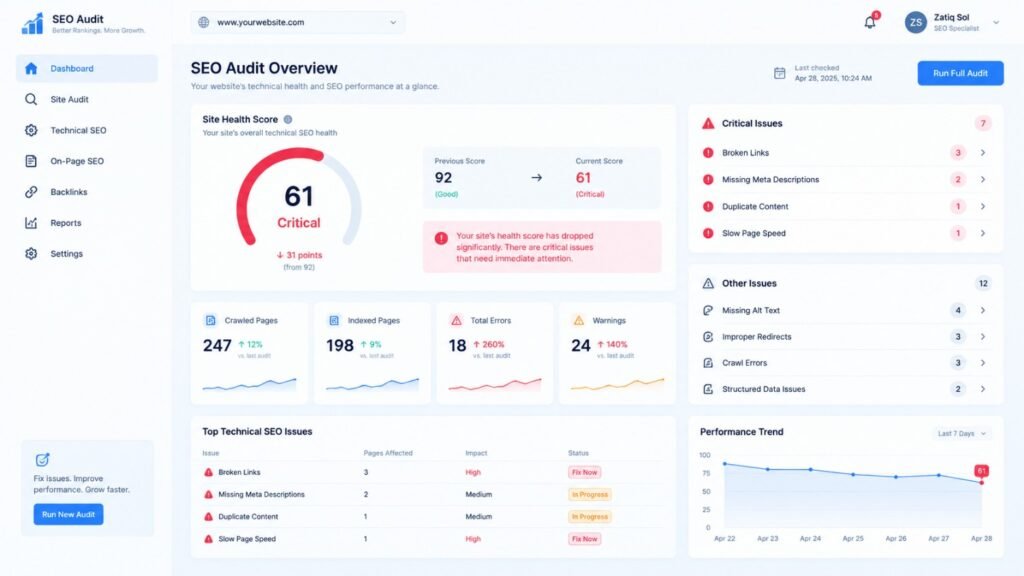
What Is a Technical SEO Audit (and Why Does It Matter in 2027)?
A technical SEO audit is a structured review of your site’s infrastructure. It checks whether search engines can crawl, render, understand, and index your pages. Think of it as a health checkup. Great content on a broken site is like a great restaurant with a locked front door. Google’s own technical requirements documentation lists the basics. Pages must be accessible, return a proper status code, and contain indexable content. Many sites still miss one of those three.
Here is why it matters more now:
- Search is split. Google, Bing, and AI answer engines all crawl your site.
- Speed bars are tougher. Only about half of the web passes Core Web Vitals.
- Sites are heavier. JavaScript frameworks create rendering gaps.
- Competition is fierce. Technical gaps are the cheapest edge to close.
If you’ve wondered whether any of this still works, read our take on whether SEO is dead in 2026. Short answer: no, but sloppy SEO is.
How Bad Is the Problem? What Do Recent Studies Say?
Let’s look at the data.
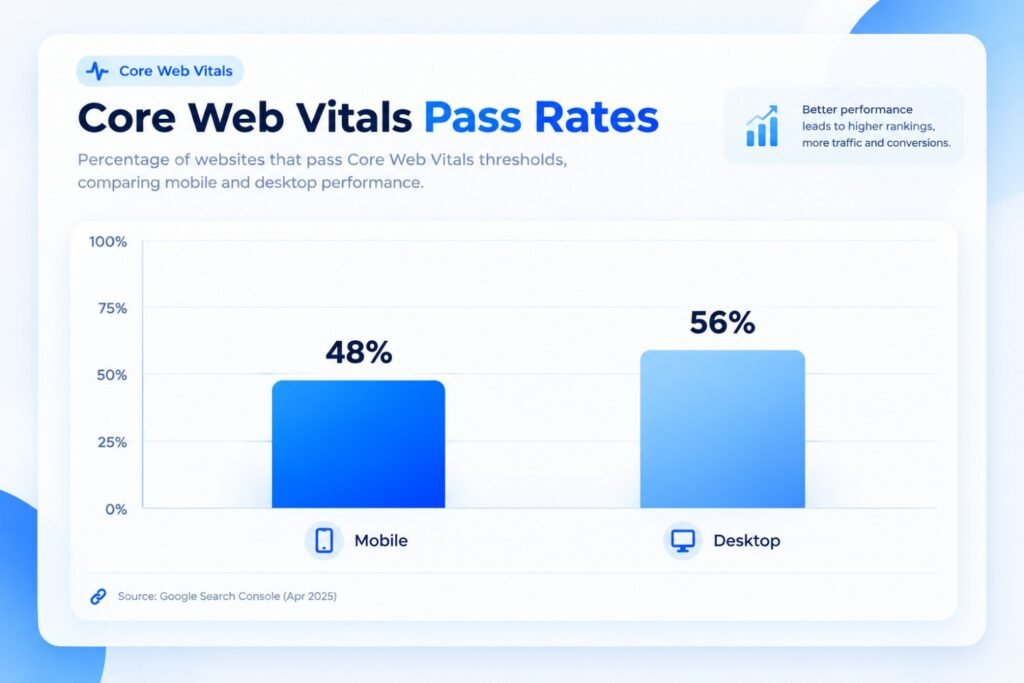
According to the 2025 Web Almanac by HTTP Archive, 48% of mobile sites and 56% of desktop sites pass all three Core Web Vitals. LCP, the loading metric, was the weakest, with only about 62% of mobile sites passing it. Flip that around. Roughly half of all websites deliver a below-par experience. The 2025 Web Almanac SEO chapter also reported that about 10% of sites had invalid HTML elements inside the <head>. That matters because a broken head can hide canonical tags, hreflang, and meta descriptions from crawlers.
Two takeaways:
- Most competitors have technical weaknesses too.
- Fixing yours can leapfrog them without writing a single new article.
What Should a Technical SEO Audit Checklist Include? (The 15 Critical Issues)
Here’s the full list. Work top to bottom. Earlier items block everything after them.
1. Is Your robots.txt File Blocking Important Pages?
One stray line can hide your whole site.
Check: Open yourdomain.com/robots.txt. Look for Disallow: / or blocked folders like /blog/ or /products/.
Fix: Remove blocks on valuable sections. Keep blocks only for admin, cart, and internal search pages.
Pro tip: Developers often leave staging rules in place after launch. Always re-check robots.txt after a redesign.
2. Are Your Key Pages Actually Indexed?
Crawled does not mean indexed.
Check: Use Google Search Console’s Pages report. Compare “Indexed” against “Why pages aren’t indexed.”
Watch for:
- “Crawled – currently not indexed”
- “Discovered – currently not indexed”
- Accidental noindex tags
Fix: Improve thin pages, add internal links, and remove stray noindex directives.
3. Is Your XML Sitemap Clean and Current?
Your sitemap is a promise. Don’t lie in it.
Check: Make sure it lists only 200-status, canonical, indexable URLs. No redirects. No 404s. No noindex pages.
Fix: Regenerate it automatically, then submit it in Search Console.
4. Do Your Core Web Vitals Pass?
Google’s thresholds are simple:
- LCP (loading): 2.5 seconds or less
- INP (responsiveness): 200 milliseconds or less
- CLS (visual stability): 0.1 or less
Check: PageSpeed Insights and the Core Web Vitals report in Search Console. Trust field data over lab data.
Fix:
- Compress and lazy-load images
- Serve modern formats like WebP or AVIF
- Preload your hero image
- Defer non-critical JavaScript
- Reserve space for ads and embeds
Real mistake: Lazy-loading the hero image. It delays LCP instead of helping it.
5. Is Your Site Truly Mobile-Friendly?
Google indexes the mobile version first. If your mobile page hides content, that content may not count.
Check: Compare mobile and desktop versions. Look at tap targets, font size, and hidden tabs.
Fix: Use responsive design. Keep content and structured data identical across versions.
6. Is Your Site Fully on HTTPS?
Mixed content erodes trust and can break features.
Check: Look for HTTP resources on HTTPS pages. Confirm one version of your domain redirects cleanly (www vs non-www, http vs https).
Fix: Install a valid certificate, force HTTPS, and update internal links.
7. Do You Have Duplicate Content and Canonical Problems?
Duplicates split ranking signals across URLs.
Common causes:
- URL parameters and tracking tags
- Trailing slash variations
- Printer-friendly pages
- Product variants
Fix: Add self-referencing canonical tags. Consolidate duplicates with 301 redirects.
8. Are Redirect Chains and Loops Wasting Crawl Budget?
A to B to C to D is slow for users and bots.
Check: Crawl your site and filter for chains longer than one hop.
Fix: Point every redirect directly to the final destination. Update internal links so they skip redirects entirely.
9. Are Broken Links and Soft 404s Hurting You?
Broken links waste crawl budget and frustrate visitors.
Check: Look for 404s, 5xx errors, and “soft 404s,” which are empty pages returning a 200 status.
Fix: Redirect to the closest relevant page. If none exists, return a proper 404 or 410.
10. Is Your Site Architecture Easy to Crawl?
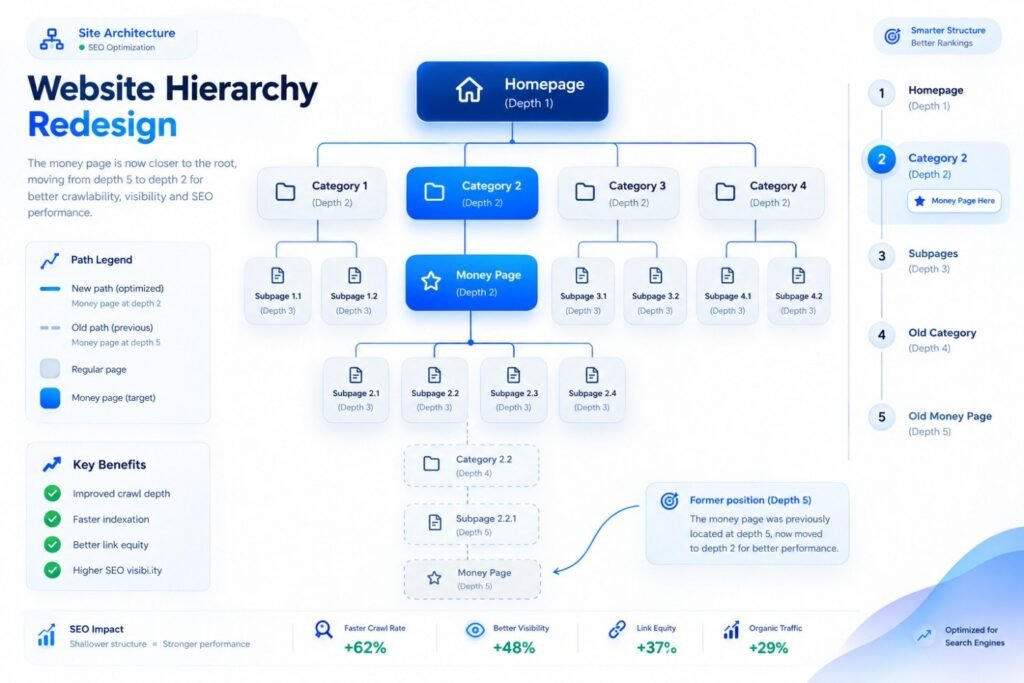
If a page is buried five clicks deep, Google treats it as unimportant.
Check:
- Click depth (aim for three clicks or fewer)
- Orphan pages with no internal links
- Clear category and hub structures
Fix: Build topic clusters. Link related posts to hub pages and back again. This is also where good internal linking pays off, like our guide on SEO and social media marketing for real estate.
11. Can Search Engines Render Your JavaScript?
This one is a silent killer on modern sites.
Check: Use the URL Inspection tool’s “View crawled page.” Compare it to what a user sees. Then disable JavaScript in your browser and reload.
Fix: Use server-side rendering or static generation for important content. Don’t hide key text behind clicks or scripts.
Heads-up: Many AI crawlers reportedly don’t execute JavaScript at all. If your content only appears after scripts run, those systems may never see it.
12. Is Your Structured Data Valid?
Schema helps machines understand your pages. Broken schema earns nothing.
Check: Google’s Rich Results Test and Search Console’s Enhancements reports.
Fix: Implement relevant types: Organization, Article, FAQ, Product, LocalBusiness, BreadcrumbList. Make sure markup matches visible content.
13. Is Hreflang Set Up Correctly for International Sites?
Hreflang errors rank among the most common in international SEO.
Check: Every hreflang tag needs a return tag. Language and region codes must be valid.
Fix: Use a consistent method (head tags, headers, or sitemap). Include a self-reference on every page.
14. Are Titles, Meta Tags, and Headings in Order?
These are basic, yet audits keep finding problems.
Check for:
- Missing or duplicate title tags
- Titles over roughly 60 characters
- Multiple H1 tags with no logic
- Invalid elements inside the head
Fix: Write one unique title and description per page. Keep one clear H1 and a logical H2/H3 flow.
15. Can AI Crawlers and Bots Access Your Content?
This is the fresh 2026–2027 item most checklists skip.
Check:
- Review robots.txt rules for AI user agents
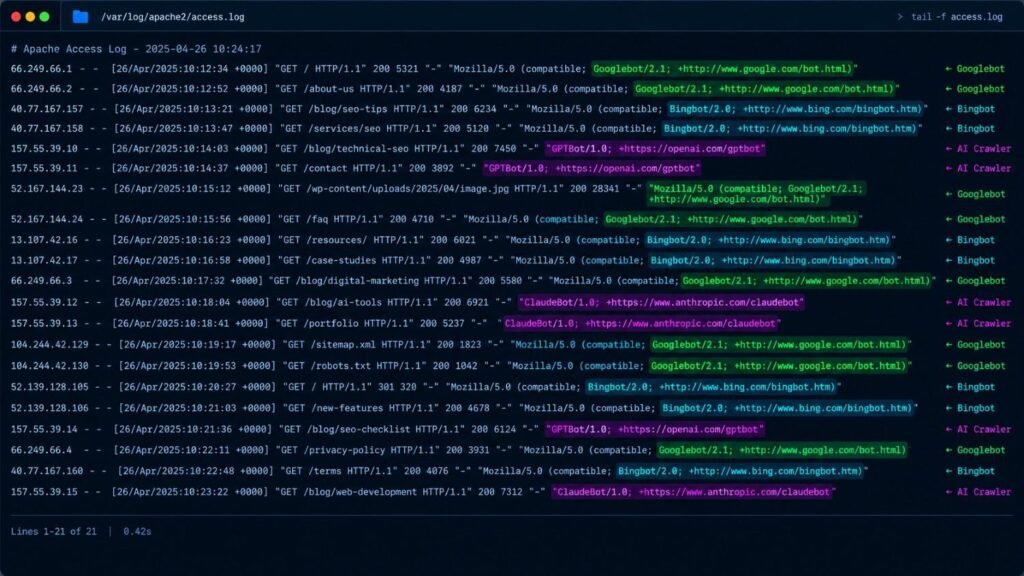
- Check server logs to see which bots visit
- Confirm your firewall or CDN isn’t blocking legitimate crawlers
Fix: Decide deliberately which AI bots to allow. Blocking by accident is common, especially with aggressive bot-protection settings.
Honest note: Files like llms.txt are being discussed widely. No major search engine has confirmed them as a ranking factor, so treat them as optional.
What Happens When You Fix These Issues? Two Real-World Scenarios
Numbers make this concrete. These two scenarios mirror patterns SEO teams regularly report from audits.
Scenario 1: The Redesign That Erased Traffic
A mid-sized B2B software company relaunched its site. Within three weeks, organic traffic fell from about 38,000 monthly visits to 21,000. That’s a 45% drop.
The audit found three problems:
- A leftover noindex tag on the entire /solutions/ folder
- 412 old URLs redirecting through chains of three hops or more
- A sitemap listing 600+ dead URLs
The team removed the noindex tag, flattened the redirects, and cleaned the sitemap. Recovery took about eight weeks. Traffic climbed back to roughly 41,000 visits, and demo requests rose by about 22%.
Lesson: The content was never the problem. A 10-minute checklist review before launch would have caught it.
Scenario 2: The Slow Store With Great Products
An online retailer had strong product pages but a mobile LCP of 4.8 seconds. Hero images weighed 1.9 MB each.
The fixes were basic:
- Convert images to WebP
- Preload the hero image
- Remove two unused chat and tracking scripts
Mobile LCP dropped to 2.2 seconds. Over the next quarter, mobile conversion improved by around 14%, and bounce rate fell noticeably.
Lesson: Speed fixes often cost less than a single month of ad spend.
What Are the Best Technical SEO Audit Tools?
You don’t need ten tools. You need two or three used well.
Here’s a comparison of the best technical SEO audit tools for different needs.
| Tool | Best For | Strengths | Limitations | Approx. Pricing* |
|---|---|---|---|---|
| Google Search Console | Indexing and real Google data | Free, first-party, Core Web Vitals field data | No full-site crawling; limited history | Free |
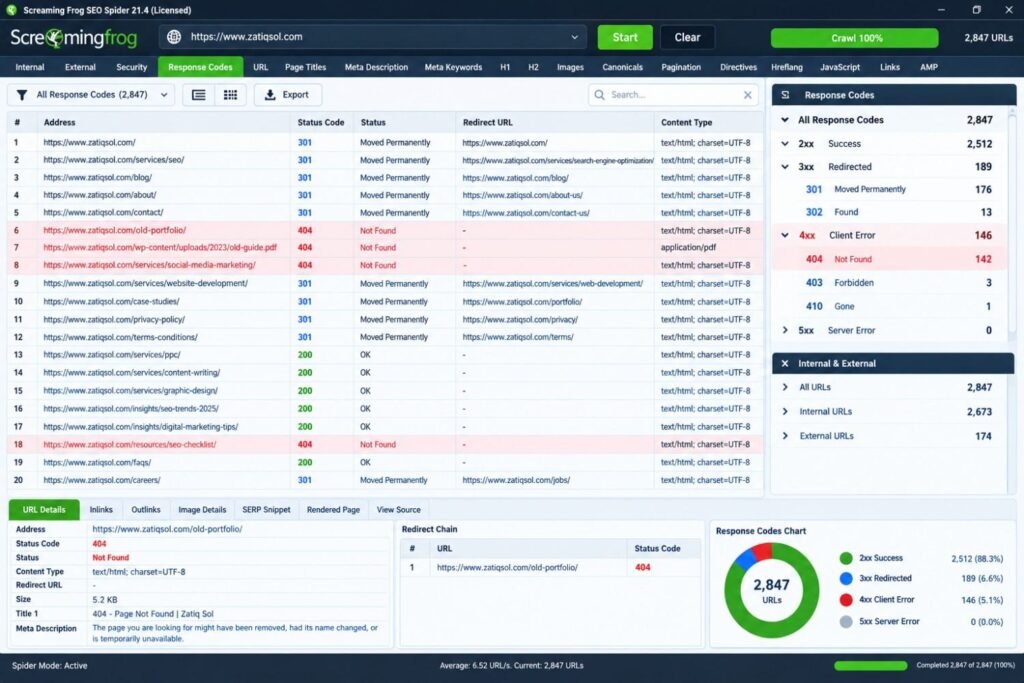
| Screaming Frog SEO Spider | Deep desktop crawling | Custom extraction, JavaScript rendering, redirect mapping | Learning curve; memory-heavy on big sites | Free up to 500 URLs; paid licence yearly |
| Ahrefs Site Audit | Ongoing cloud monitoring | Scheduled crawls, clear reports, backlink data | Pricier for small teams | Monthly subscription |
| Semrush Site Audit | Agencies and large reporting needs | Prioritized issues, white-label exports | Can overwhelm beginners | Monthly subscription |
| PageSpeed Insights / Lighthouse | Page-level speed diagnosis | Free, shows lab and field data | One URL at a time | Free |
| Server log analyzers | Seeing true bot behavior | Reveals crawl waste and AI bot visits | Needs server access and setup | Free to paid |
*Pricing changes often. Check each vendor’s site for current plans.
Want to learn the crawler properly? The Screaming Frog SEO Spider tutorials are a solid free starting point. For quick, lightweight checks, some teams also try Letaido alongside their main crawler.
Pro tip: Never rely on one tool’s score. Each tool flags different things. Cross-check the high-priority errors in Search Console.
Do You Need a Technical SEO Audit Template?
Yes. A technical SEO audit template keeps you consistent and makes progress easy to report.
Here’s a simple one you can copy into a spreadsheet:
| Priority | Check | Status | Owner | Due Date | Notes |
|---|---|---|---|---|---|
| High | robots.txt reviewed | ☐ | Dev | — | |
| High | Indexation errors cleared | ☐ | SEO | — | |
| High | Core Web Vitals pass | ☐ | Dev | — | |
| High | Redirect chains fixed | ☐ | Dev | — | |
| Medium | Sitemap clean | ☐ | SEO | — | |
| Medium | Canonicals correct | ☐ | SEO | — | |
| Medium | Schema valid | ☐ | SEO | — | |
| Low | Heading structure | ☐ | Content | — | |
| Low | Hreflang validated | ☐ | SEO | — |
How to use it:
- Crawl the site.
- Log every issue under its category.
- Score each by impact and effort.
- Fix high-impact, low-effort items first.
- Re-crawl after each batch.
Pro tip: Add a “date verified” column. It stops the same issue from sneaking back after the next deployment.
How Much Does a Technical SEO Audit Cost?
Technical SEO audit cost varies widely. Here are typical market ranges in USD. Treat them as ballparks, not quotes.
| Option | Typical Range | Best For |
|---|---|---|
| DIY with free tools | $0 | Small sites under 500 pages |
| DIY with paid tools | ~$30–$250/month | Growing sites, in-house teams |
| Freelancer audit | ~$500–$2,500 | Small to mid-sized business sites |
| Agency audit | ~$2,000–$10,000+ | Large, complex, or international sites |
| Enterprise audit + implementation | $10,000+ | E-commerce, SaaS, multi-region platforms |
What drives the price:
- Number of pages and templates
- JavaScript complexity
- International setup
- Whether implementation is included
- Depth of log file analysis
Watch out: A cheap audit that’s just an exported tool report isn’t worth much. Good audits include prioritization, context, and a fix roadmap.
Technical SEO Audit Services vs. DIY: Which Should You Choose?
Both work. The right choice depends on your team.
Pros and Cons: DIY Audit
| Pros | Cons |
|---|---|
| Low cost | Time-consuming |
| You learn your site deeply | Easy to misread data |
| Full control over timing | Risk of breaking things during fixes |
| Good for small sites | Hard to prioritize without experience |
Pros and Cons: Professional Technical SEO Audit Services
| Pros | Cons |
|---|---|
| Faster, more thorough results | Higher upfront cost |
| Expert prioritization | Quality varies by provider |
| Access to premium tools | Needs onboarding and access |
| Implementation support available | Requires clear communication |
A simple rule: Go DIY if you have under 500 pages and a developer on hand. Hire experts if you have complex JavaScript, multiple regions, or recent traffic drops. Teams that want help can explore Zatiq Sol’s SEO services for audits and ongoing fixes.
How Do Zatiq Sol’s Services Connect to Technical SEO in Real Projects?
Technical SEO rarely lives alone. Here’s how it ties to other work.
- Custom Software Development: Clean architecture, API-driven pages, and sensible URL structures prevent problems before launch.
- Mobile App Development: Deep linking and app-to-web handoffs need crawlable web equivalents.
- UI/UX Design: Layout shift (CLS) and tap-target problems are design issues first.
- AI Development: Automated log analysis and anomaly detection can flag crawl issues faster. See our AI development work.
- Digital Marketing: Paid and social campaigns waste budget when landing pages load slowly.
- IT Outsourcing: A dedicated dev team can ship technical fixes without clogging your internal roadmap.
Sector context matters too. For example, niche industries often have unusual page structures and seasonal content. We covered this in our guide to digital marketing for agriculture businesses.
How Often Should You Run a Technical SEO Audit?
Here’s a practical schedule:
- Full audit: Every 6 months
- Light crawl: Monthly
- Core Web Vitals check: Monthly
- Post-launch audit: Within 48 hours of any redesign, migration, or CMS update
- Search Console review: Weekly
Mistake to avoid: Auditing only when traffic drops. By then, you’ve already lost weeks of revenue.
What Are the Most Common Technical SEO Audit Mistakes?
Learn from others’ errors:
- Fixing everything at once. Prioritize by impact.
- Trusting lab data alone. Real user data tells the truth.
- Ignoring mobile. It’s your primary index.
- Skipping the post-fix recrawl. Never assume it worked.
- Treating scores as goals. A 100/100 score doesn’t guarantee rankings.
- Forgetting documentation. Record every change and date.
- Overlooking developers. Share clear tickets, not vague reports.
Pro tip: Write fix tickets with the URL, the problem, the expected result, and a test method. Developers love that.
What’s the first thing to check in a technical SEO audit?
Start with indexation. Search site:yourdomain.com and compare it against your Search Console indexed count. A big gap tells you where to dig first.
Can a technical SEO audit really increase leads, not just traffic?
Yes, because speed, clarity, and mobile usability affect conversion. Faster pages tend to see lower bounce. Cleaner indexing also puts your best commercial pages in front of buyers.
Do AI search tools care about technical SEO?
Mostly yes. If your content needs JavaScript to appear, some AI crawlers may miss it. Server-rendered text, clean markup, and accessible robots rules help every crawler.
Should I block AI bots in robots.txt?
It depends on your goals. Publishers worried about content reuse may block them. Brands seeking visibility in AI answers often allow them. Decide on purpose, then verify in your logs.
Is a perfect Lighthouse score necessary?
No. Lighthouse is a lab test. Google evaluates field data from real users. Aim for “Good” in Search Console, not a perfect 100.
How long until fixes show results?
Redirect, indexing, and noindex fixes can show movement in 2–6 weeks. Speed and architecture improvements often take 2–3 months to compound.
Best for US: Specific Considerations for American Businesses
If you serve US customers, add these checks on top of the 15 above.
1. Accessibility compliance. US businesses face ongoing web accessibility lawsuits under the ADA. Aim for WCAG 2.1 AA at minimum. Accessibility fixes (alt text, contrast, heading order) overlap heavily with technical SEO.
2. Privacy and consent. State laws such as California’s CCPA/CPRA affect cookie banners and tracking. Heavy consent scripts can hurt INP and LCP. Test performance after adding them.
3. Mobile speed on real networks. Many US users browse on mid-range phones and variable mobile data. Test with throttling, not just office Wi-Fi.
4. Local signals. For multi-location businesses, make sure each location has a unique, crawlable page with consistent name, address, and phone data. Add LocalBusiness schema.
5. Language targeting. Use en-US hreflang if you also serve UK, Canadian, or Australian audiences. Spelling and currency differences matter.
6. Budget expectations in USD. A small-business audit typically runs $500–$2,500. Mid-market sites often land between $2,000 and $10,000. Implementation is usually extra.
A quick US example: A regional home-services company with 14 service-area pages found that nine were near-duplicates. The pages were consolidated, unique local details were added, and canonicals were fixed. Over about four months, organic calls reportedly rose by roughly 30%.
Conclusion: Your Next Step
A technical problem can quietly cap your growth for years. The good news is that most are fixable.
Here’s your action plan:
- Run a crawl and check Search Console today.
- Fix indexing, redirects, and Core Web Vitals first.
- Use the template above to track progress.
- Re-crawl after every batch of fixes.
- Schedule your next audit before you finish this one.
Don’t chase perfection. Chase the biggest leaks first. Every fixed issue means more pages found, more visitors kept, and more leads won.
For more guides like this, browse the Zatiq Sol blog.
Ready to grow your business with custom AI, SEO, web development, or digital marketing? 👇