

Off-the-shelf software wins on day-one cost. Custom software often wins on total cost of ownership after three to five years, especially with growing user counts and awkward workflows. In the custom software vs off the shelf software decision for 2027, fit and scale decide the winner. Most growing businesses end up with a smart hybrid.
You have two quotes open. One is a $45-per-user SaaS plan. The other is a $120,000 custom build. The cheap one looks obvious. Often, it isn’t. The sticker price is only the opening bid. The real bill shows up in year two, year three, and year five. This guide walks through that bill line by line, so you can pick with your eyes open.
What Is the Real Difference Between Custom and Off-the-Shelf Software?
Off-the-shelf software is built for a broad market. You license it or rent it. Think accounting tools, CRMs, and project trackers. NIST, the US standards agency, describes COTS products as ready-made hardware and software that the general public can buy. That includes SaaS.
Custom software is built around your workflows. You decide the features, the roadmap, and the pace of change. Depending on your contract, you also own the code. The difference is control. With commercial off the shelf software vs custom software, you trade control for speed and a lower entry price.
- Off-the-shelf: Fast to start, cheaper upfront, shaped around the average customer.
- Custom: Slower to start, pricier upfront, shaped around you.
Neither is “better.” Each one is cheaper in the right conditions. The trick is knowing which conditions you’re in.
Why Is Total Cost of Ownership the Only Number That Matters?
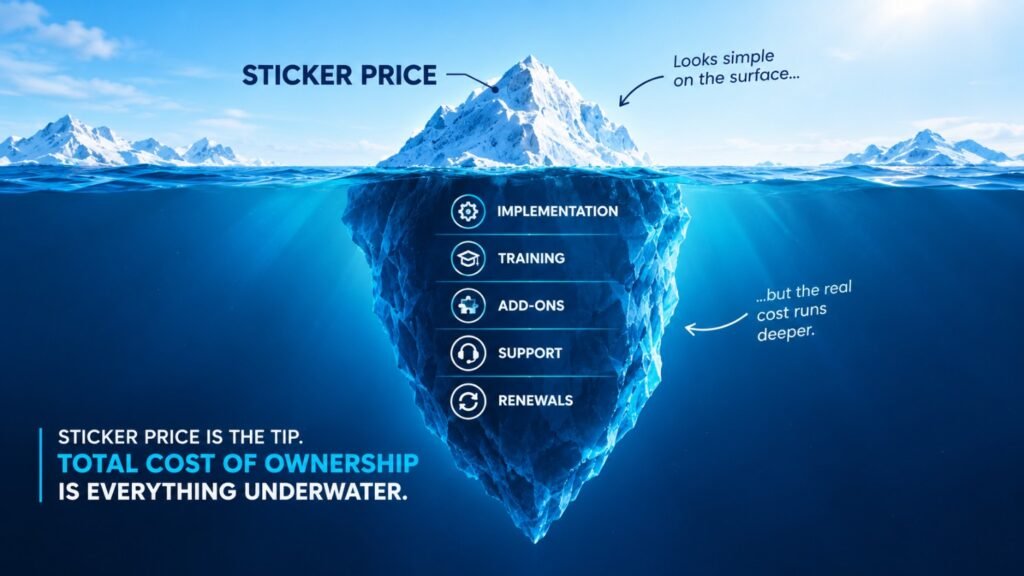
Total cost of ownership (TCO) is the full cost of something across its whole life. IBM’s TCO explainer says it covers direct costs, like purchase price. It also covers indirect costs, like the time staff spend adjusting to a new system. IBM also notes that no single formula fits every case. A rough version looks like this: TCO = initial + setup + operating + maintenance + downtime – end-of-life value
Break that into questions you can actually answer:
- What do we pay on day one?
- What does setup, migration, and training cost?
- What do we pay every month or year to run it?
- What does upkeep cost: updates, fixes, security?
- What does an outage cost us per hour?
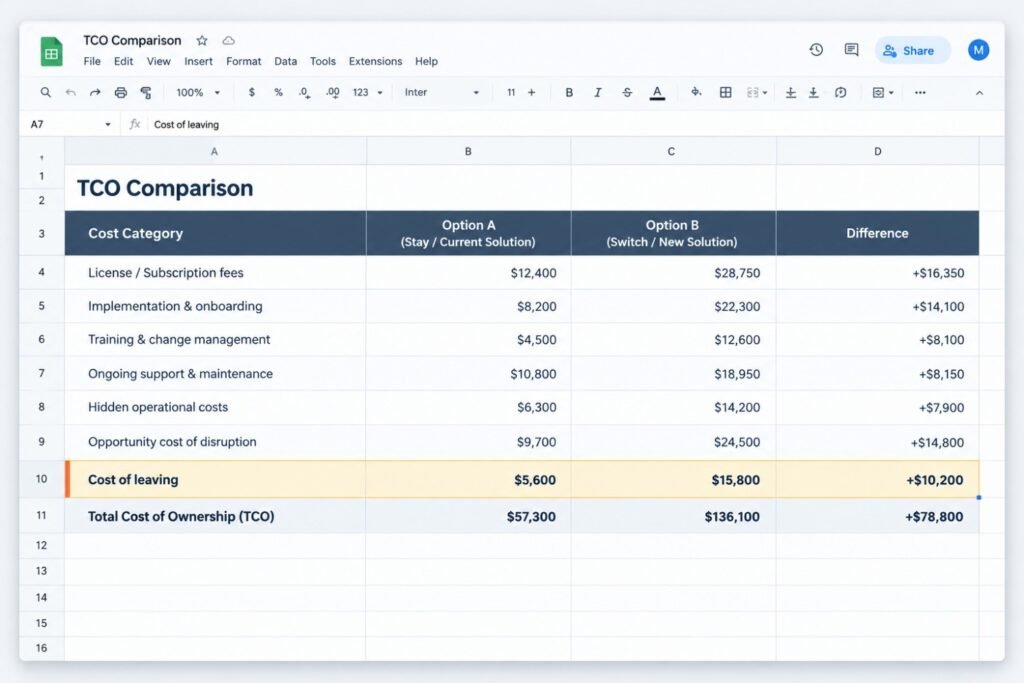
- What happens when we leave? Can we take our data and code?
Most buyers only answer question one. That’s how a “cheap” tool becomes the expensive one.
What Are the Hidden Costs of Off-the-Shelf Software?
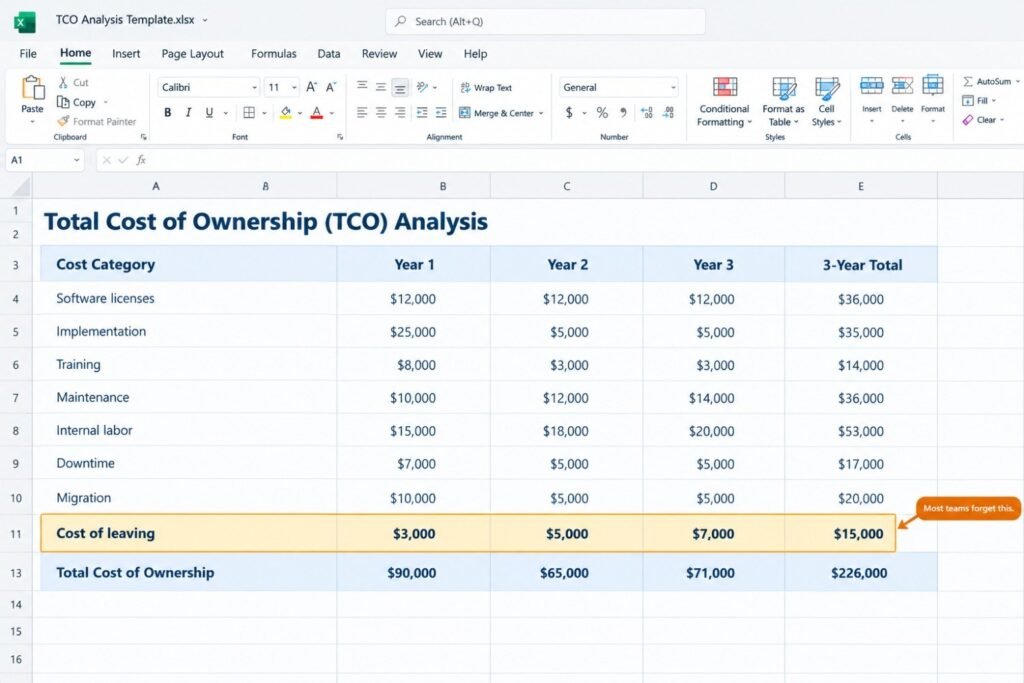
Off-the-shelf tools look friendly on a pricing page. The cost grows quietly after you sign.
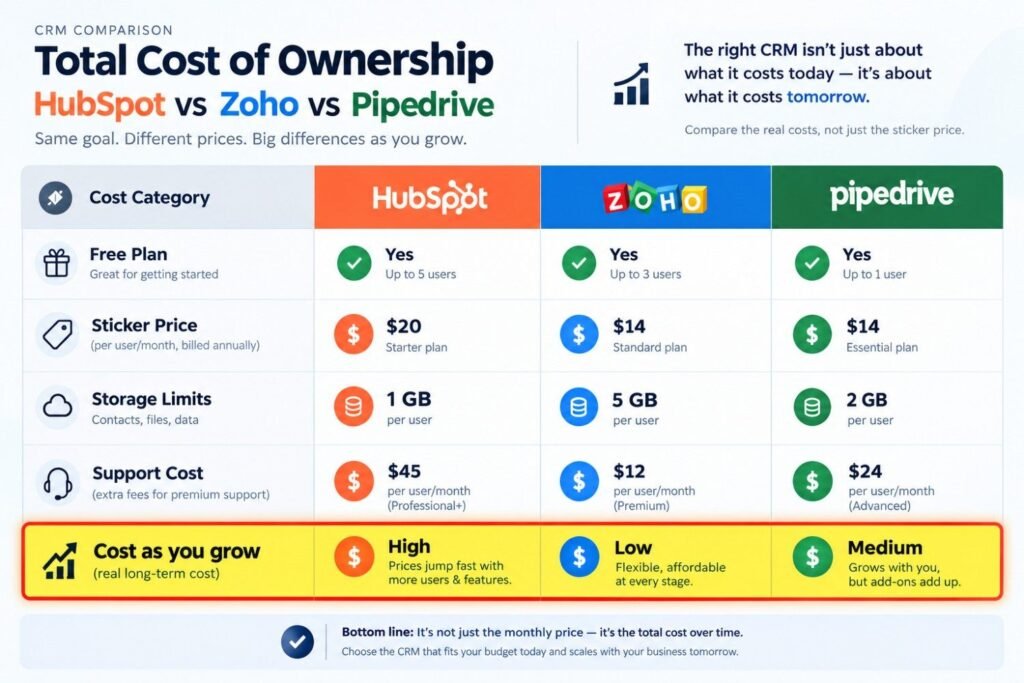
- Price creep. SaaS prices rise, and not slowly. The Vertice SaaS Inflation Index, reported by ZFort, put SaaS inflation at 13.2% in March 2026. Salesforce also raised prices twice in two years, with its latest increase in August 2025, according to Affirma.
- Seat creep. You add people. Each person adds a license. Costs scale with headcount, not value.
- Add-on fees. The base plan lacks the one feature you need. The “pro” module costs extra. Then the integration costs extra too.
- Workaround labor. The tool does 80% of the job. Humans do the other 20% by hand, forever.
- Lock-in. Exporting your data can be painful or costly. IBM also flags vendor lock-in and switching costs as lifecycle risks.
Here’s the kind of story that plays out often. Picture a 60-person logistics company. Twelve dispatchers re-key orders from a booking tool into a billing tool. It takes about 40 minutes per person per day. That’s roughly 2,000 hours a year. At about $28 an hour, it costs around $56,000 annually. Nobody sees it on an invoice, because it hides inside payroll. Now suppose they build a simple custom integration for about $48,000 over ten weeks. It pays for itself in roughly ten months. After that, it’s pure savings. (Illustrative number
Pro tip: Ask every team one question: “What do you do by hand because the software can’t?” Multiply those hours by your loaded hourly rate. That number is your hidden workaround bill.
What Are the Hidden Costs of Custom Software?
Custom has its own traps. Skipping them is how projects go sideways.
- Maintenance. Software isn’t “done.” Plan for roughly 15–20% of the build cost per year for updates, fixes, and small features. This is a common planning rule, not a law. Your actual number depends on complexity.
- Scope creep. Every “quick addition” adds weeks. A fixed scope with a phased roadmap protects your budget.
- Key-person risk. If one developer holds all the knowledge, you’re one resignation away from trouble.
- Security responsibility. You own the risk now. A June 2026 CIO.com opinion piece cites independent reviews of AI-generated code. They report basic failure rates approaching half of samples, including leaked secrets and weak access controls.
- Slower start. Weeks or months pass before anyone uses it. You pay for the gap.
Here’s the second story, and it’s a warning. Imagine a startup that spends $90,000 on a custom CRM. Leadership budgets nothing for upkeep. Fourteen months in, the lone developer leaves. There’s no documentation. A new team spends about $22,000 just untangling the code. The software was fine. The plan wasn’t. (Illustrative numbers.)
How to read this table: Off-the-shelf wins the early rounds, which are cost and speed. Custom wins the later rounds, which are scale, fit, and control. Your choice depends on how long you will use the software and how many people will use it.
📸
How Do Custom and Off-the-Shelf Software Compare Side by Side?
Here is a direct, row-by-row comparison. The last column shows which option usually comes out ahead on each factor.
| Factor | Off-the-Shelf Software | Custom Software | Usually Wins |
|---|---|---|---|
| Upfront cost | Low: subscription or license fee | Higher: design, build, testing | Off-the-shelf |
| Time to launch | Days to weeks | Weeks to months | Off-the-shelf |
| Recurring cost | Per-user fees that tend to rise yearly | Hosting and maintenance, mostly flat | Custom (long term) |
| Cost as you grow | Rises with every added seat | Rises with infrastructure, not headcount | Custom |
| Fit to your workflow | Partial, so workarounds are common | Built around your exact process | Custom |
| Integrations | Limited to the vendor’s connectors | Any system that offers an API | Custom |
| Ownership | Vendor owns the product | You own the code (per contract) | Custom |
| Roadmap control | Vendor decides what ships | You decide | Custom |
| Security | Vendor secures the platform | You or your build partner own it | Depends on the team |
| Maintenance effort | Handled by the vendor | Your responsibility (~15–20% yearly) | Off-the-shelf |
| Exit flexibility | Data export may be limited or costly | High, if code and docs are handed over | Custom |
| Best fit | Standard processes, small teams | Unique workflows, growing user counts | Depends on your case |
How to read this table: Off-the-shelf wins the early rounds, which are cost and speed. Custom wins the later rounds, which are scale, fit, and control. Your choice depends on how long you will use the software and how many people will use it.
What Are the Pros and Cons of Each Option?
Off-the-shelf software
| Pros | Cons |
|---|---|
| Quick setup | Rising subscription costs |
| Low entry price | Workarounds for gaps |
| Vendor handles updates | Vendor controls the roadmap |
| Proven by other customers | Lock-in and exit friction |
Custom software
| Pros | Cons |
|---|---|
| Fits your process exactly | Higher upfront spend |
| Flat cost as users grow | Slower to launch |
| You control features and data | Ongoing maintenance needed |
| Can become a competitive edge | Needs a reliable build partner |
How Much Does Each Option Cost Over Five Years?
Let’s run a simple, illustrative model. Assume a 60-user team, a mid-complexity workflow tool, and a five-year window. These are modeling assumptions, not quotes. Your numbers will differ.
| Cost line (5 years) | Off-the-shelf | Custom |
|---|---|---|
| Licenses ($45/user/month, ~8% yearly rise) | $190,000 | — |
| Build (discovery, UX, development, QA) | — | $120,000 |
| Setup and data migration | $15,000 | — |
| Integrations / connectors | $20,000 | — |
| Cloud hosting | — | $90,000 |
| Maintenance (~18% of build yearly) | — | $108,000 |
| Training and rollout | — | $10,000 |
| Security review | — | $15,000 |
| Workaround labor (15 min/user/week at $40/hr) | $156,000 | — |
| Total | $381,000 | $343,000 |
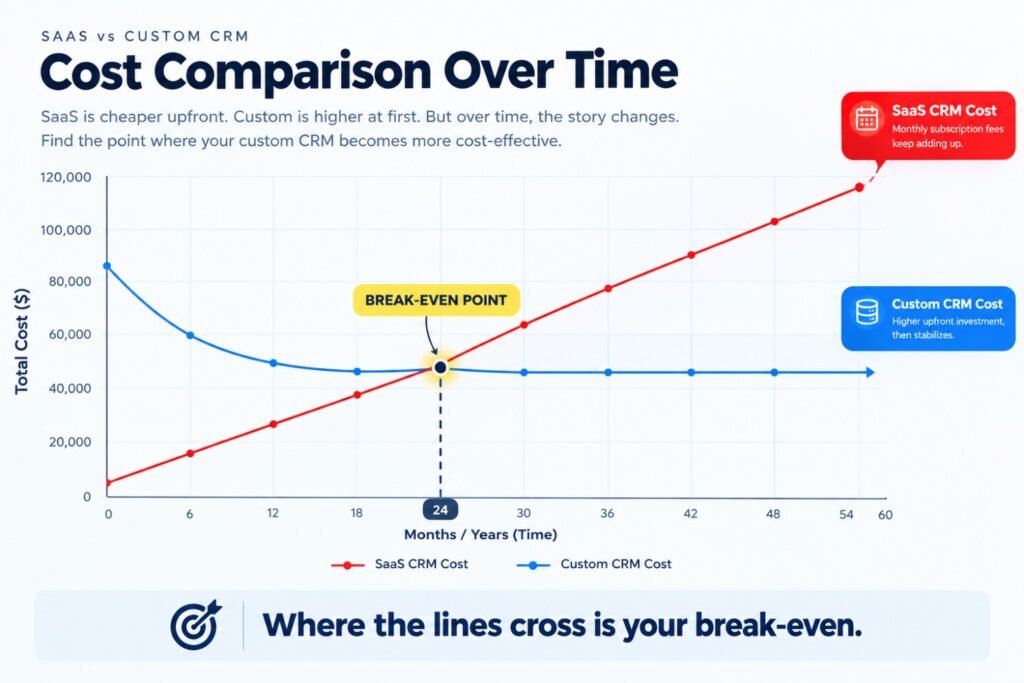
At 60 users, the gap is narrow, around 10%. Off-the-shelf wins in year one. Custom pulls ahead around year three or four. Now grow to 150 users. Licenses and workaround time scale with headcount. Custom costs barely move. In this model, the gap passes $400,000. That’s why user count is the biggest swing factor. It’s also why the custom software vs off the shelf software question has no universal answer.
For reference, here are typical market ranges. They vary by region, team, and scope:
| Project type | Typical custom build range | Typical off-the-shelf equivalent |
|---|---|---|
| Simple internal tool | $25,000–$60,000 | $10–$30 per user/month |
| Mid-complexity business platform | $80,000–$250,000 | $30–$100 per user/month |
| Large enterprise system | $300,000+ | $100+ per user/month, plus services |
When Should You Choose Off-the-Shelf Software?
Don’t build what you can safely buy. Choose off-the-shelf when:
- The process is a commodity: payroll, email, accounting, calendars.
- Your team is small, under 15 to 20 users.
- You need it working next week.
- No competitor advantage hides in that workflow.
- You lack budget to maintain custom code.
The CIO.com piece makes the same point. Commodity workflows still belong to the SaaS market. Nobody should build their own ERP for sport.
When Does Custom Software Win?
Custom wins where your workflow is the business. Look for these signals:
- Staff export to spreadsheets daily, just to finish a job.
- Per-user fees keep growing faster than the value you get.
- You need to connect three or four systems that don’t talk.
- Compliance rules demand specific data handling.
- Customers experience your process, and you want it to feel unique.
Here’s where this plays out in real projects:
- Custom software development: Replace a patchwork of tools with one system. Our full-stack web development team builds these end to end.
- AI development: Add an internal assistant that reads contracts, routes tickets, or flags anomalies. Generic tools rarely know your data. See our AI development services.
- Mobile app development: A field-service app that works offline beats a generic tool that doesn’t.
- UI/UX: Cut training time by designing around how your people actually work.
- Digital marketing and SEO: A custom lead-routing layer ties campaigns to your CRM with no manual copying.
- IT outsourcing: A dedicated team gives you build capacity without hiring a full department.
- Cloud: Right-sized infrastructure keeps hosting costs predictable. Our cloud services help here.
Training platforms are a good example. Per-learner pricing gets expensive fast as your audience grows. If that’s you, read our guide to custom eLearning platform development.
Is a Hybrid Approach the Smartest Move in 2027?
For many companies, yes. The old rule was simple: don’t build unless you’re a software company. That rule is aging. The CIO.com article argues that AI-assisted development has cut the time and cost of building. It cites productivity gains of 70–90% on routine engineering tasks. It also reports that roughly 65% of users on AI coding platforms come from non-developer backgrounds.
Read that carefully. Building got cheaper. Governing what you build did not. So the 2027 playbook looks like this:
- Buy commodity workflows.
- Build workflows that set you apart.
- Connect both with clean APIs.
- Govern everything: security reviews, documentation, ownership.
Cheaper code is not free code. You still need design, testing, and maintenance. AI speeds up the typing. It doesn’t replace the thinking.
How Do You Calculate Your Own TCO?
Use this five-step method. It takes an afternoon.
- Set the window. Pick three to five years.
- List every cost bucket. Use IBM’s categories: initial, setup, operating, maintenance, downtime, end-of-life.
- Add the human cost. Count hours spent on workarounds, training, and support requests.
- Model growth. Recalculate at 1x, 2x, and 3x your user count.
- Stress-test it. Add a 15% price rise for SaaS. Add a 20% overrun for custom.
If one option wins under every scenario, you have your answer. If the answer flips, you’re near break-even. That’s when a hybrid makes sense.
Pro tip: Run the model with your finance lead. They’ll catch costs you missed. They’ll also trust the result more.
What Mistakes Do Businesses Make When Choosing?
The same errors repeat across projects:
- Comparing price to price. Compare five-year cost to five-year cost.
- Ignoring exit costs. Ask how you’d leave before you sign.
- Building too much at once. Start with a small, valuable core.
- Skipping maintenance budget. Treat upkeep as part of the price.
- Forgetting adoption. The best tool fails if staff avoid it. Good UI/UX is a cost saver.
- Choosing by vendor demo. Demos show the happy path. Test your messy real workflow.
The fix is usually boring. Write down requirements, model costs, and pilot before committing.
How Do Enterprises Approach Off-the-Shelf vs Custom Software Development?
For enterprises, off-the-shelf vs custom software development is rarely either/or. Large companies run hundreds of systems.
Three things change at scale:
- Per-seat pricing hurts more. Thousands of users make licensing a major line item.
- Integration dominates. The hard part isn’t any one tool. It’s connecting them.
- Governance matters. Security, audit trails, and data residency drive decisions.
Large teams often buy the core platform and build differentiating layers on top. They use APIs to keep each piece replaceable. That limits lock-in without rebuilding everything.
Can AI coding tools make custom software cheap enough to replace SaaS?
For small internal tools, often yes. For systems handling sensitive data or many users, not on their own. AI cuts build time. It doesn’t remove testing, security review, or maintenance. Treat AI as a speed boost for a professional team, not a substitute for one.
What is the break-even point between custom and off-the-shelf?
It depends on user count and fit. In the model above, parity sat near three to four years at 60 users. Past 100 users, or with heavy workarounds, break-even arrives sooner. Run your own numbers at 1x, 2x, and 3x headcount.
Can I start with off-the-shelf and move to custom later?
Yes, and it’s a smart path. Use the SaaS tool to learn your real needs. Export data regularly from day one. When workarounds pile up, build only the parts that hurt. Just confirm your export rights before signing.
Who owns the code in a custom project?
Whoever your contract says. Many agencies keep rights unless you negotiate otherwise. Insist on full code ownership, repository access, and documentation at handover. Ownership you can’t prove is ownership you don’t have.
Is custom software more secure than off-the-shelf?
Not automatically. Vendors invest heavily in platform security. Custom code is only as safe as its testing and review. Budget for a security assessment. Treat it as part of the build, not an extra.
Conclusion: So, Which One Costs Less?
Here’s the honest answer. Off-the-shelf costs less to start. Custom often costs less to own, once your team grows and your workflows get specific. The winning move in 2027 is rarely all-or-nothing. Buy the commodity tools. Build what makes you different. Model five years, not five minutes. Use TCO as your compass. Count the hidden hours. Ask about exit costs. Budget for upkeep. Do that, and either choice can be the right one. If you’re weighing a real project, a second pair of eyes helps. A short conversation can save months of rework.
Ready to grow your business with custom AI, SEO, web development, or digital marketing? 👇\