

AI workflow automation beats traditional automation when your work involves messy data, changing rules, or judgment calls. Traditional automation still wins for fixed, high-volume, rule-based tasks. Most businesses in 2026 need both. Start with one painful workflow, measure the result, then scale. This guide shows costs, risks, use cases, and region-specific advice for the US, UK, Canada, and Australia.
Picture this. It’s Monday morning. Your team is copying data between three tools again.
A bot you built last year just broke because a vendor changed one column name. Nobody knows who owns the fix.
Sound familiar? You’re not alone. This is the exact moment most businesses start asking whether AI workflow automation is worth the switch.
At Zatiq Sol, our team builds software, runs SEO, and automates operations for growing businesses. We’ve seen both approaches succeed. We’ve also seen both fail badly.
This guide gives you the honest answer. No hype. Just what works, what it costs, and how to choose.
What Is AI Workflow Automation?
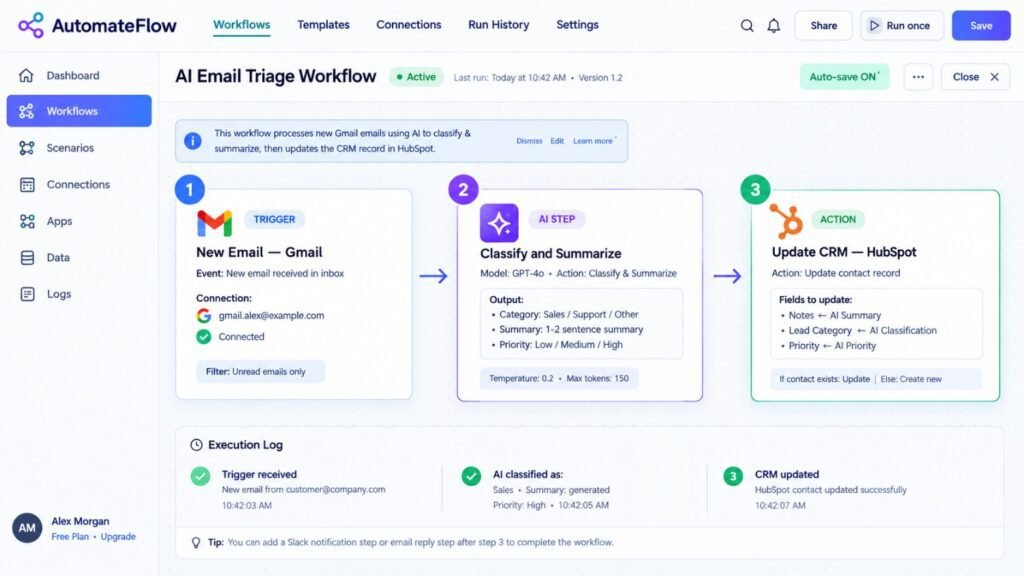
AI workflow automation uses machine learning, language models, and AI agents to run business processes. Unlike older tools, it can read, interpret, decide, and adapt. It doesn’t just follow a script. It handles variation.
Here’s what that looks like in practice:
- Reading a PDF invoice with a layout it has never seen
- Replying to a customer email in the right tone
- Routing a support ticket by intent, not keywords
- Flagging a suspicious transaction using patterns, not fixed rules
- Triggering follow-up steps across your CRM, inbox, and billing tool
The key idea is simple. Traditional tools execute instructions. AI workflow automation interprets situations. Modern systems also use AI agents. These are software workers that plan multiple steps and use tools to finish a goal. McKinsey describes them as systems that can plan and execute multiple steps in a workflow.
What Is Traditional Automation (and Where Does It Still Win)?
Traditional automation follows fixed rules. Think “if this, then that.”
It includes:
- Rule-based scripts and scheduled jobs
- Robotic Process Automation (RPA) bots that click through screens
- Workflow tools with hard-coded triggers and conditions
- Macros and integrations between apps
It’s predictable. It’s cheap to run. It’s easy to audit. And honestly? It’s still the right answer for many tasks. If a process never changes, don’t add AI. A payroll export that runs every Friday at 5 PM doesn’t need a language model. A simple script does it better and costs almost nothing.
Pro tip: If you can write the full logic on one sheet of paper, use traditional automation. If you can’t, you probably need AI.
Traditional automation follows fixed rules. Think “if this, then that.”
It includes:
- Rule-based scripts and scheduled jobs
- Robotic Process Automation (RPA) bots that click through screens
- Workflow tools with hard-coded triggers and conditions
- Macros and integrations between apps
It’s predictable. It’s cheap to run. It’s easy to audit.
And honestly? It’s still the right answer for many tasks.
If a process never changes, don’t add AI. A payroll export that runs every Friday at 5 PM doesn’t need a language model. A simple script does it better and costs almost nothing.
Pro tip: If you can write the full logic on one sheet of paper, use traditional automation. If you can’t, you probably need AI.
Let’s put them side by side.
| Factor | Traditional Automation | AI Workflow Automation |
|---|---|---|
| Logic | Fixed “if-then” rules | Learns patterns and interprets context |
| Data Types | Structured only (forms, tables) | Structured and unstructured (emails, PDFs, voice, chat) |
| Handling Change | Breaks when inputs change | Adapts to new formats and edge cases |
| Setup Speed | Fast for simple tasks | Moderate; needs data and testing |
| Maintenance | High when processes shift | Lower for variation, but needs monitoring |
| Decision Making | None; follows rules only | Recommends or makes bounded decisions |
| Cost to Start | Low | Low to high, depending on scope |
| Auditability | Very clear; every step is known | Needs logging and human review layers |
| Best For | Stable, repetitive, high-volume tasks | Variable, judgment-heavy, customer-facing work |
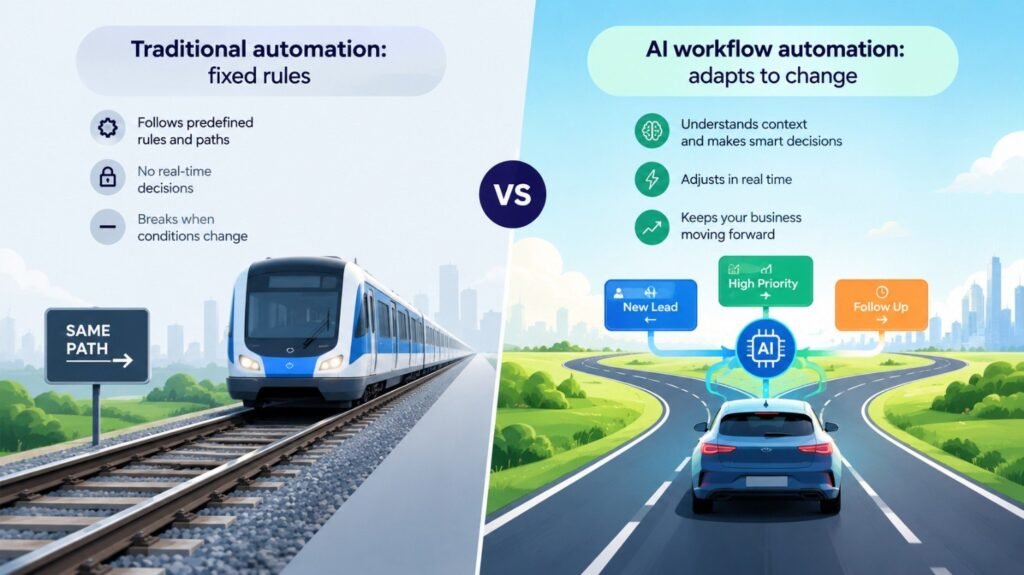
The short version? Traditional automation is a train on fixed tracks. AI workflow automation is a driver who can reroute around a closed road.
Why Are Businesses Switching to AI Workflow Automation in 2026?
Three reasons keep coming up in our client calls.
1. Work is messier than ever. Most business data now lives in emails, chats, documents, and calls. Rule-based bots can’t read that.
2. Tools change constantly. Every SaaS update can break a brittle integration.
3. Competitors are moving. The numbers prove it.
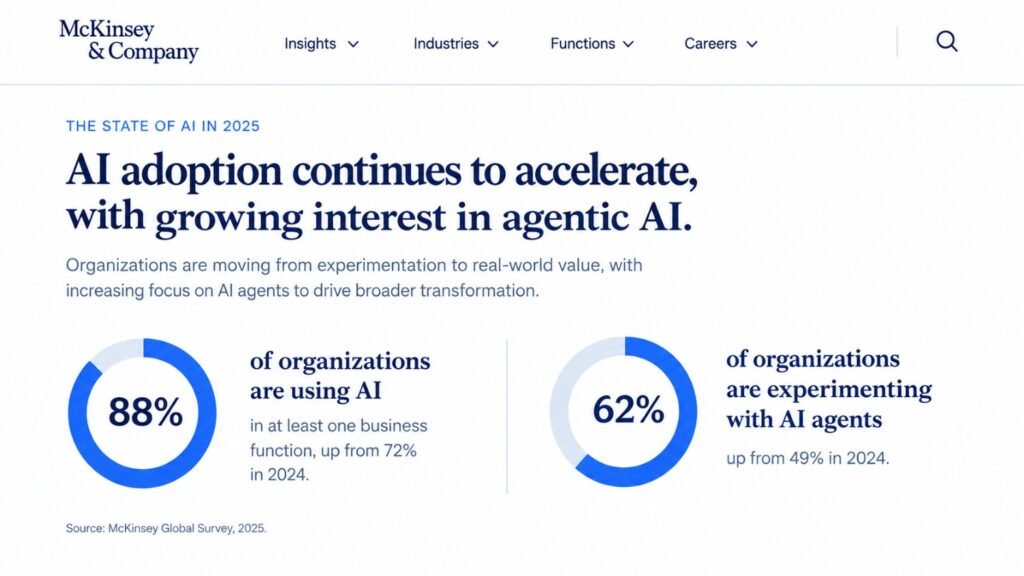
According to McKinsey’s global survey, 88% of organizations now use AI in at least one business function. The same research found that 62% are at least experimenting with AI agents. About 23% are scaling an agentic system somewhere in the business. Here’s the part worth remembering. McKinsey also found that high performers are nearly three times as likely to fundamentally redesign their workflows when deploying AI.
Read that again. Winners don’t just add AI to old processes. They rebuild the process. But there’s a warning too. Gartner predicts over 40% of agentic AI projects will be canceled by the end of 2027. The causes are rising costs, unclear value, and weak risk controls.
So the lesson isn’t “AI everywhere.” It’s “AI where it earns its keep.”
What Are the Pros and Cons of Each Approach?
Here’s the honest scorecard.
Traditional Automation: Pros and Cons
| Pros | Cons |
|---|---|
| Handles messy, variable inputs | Higher setup and data-prep effort |
| Reduces exception queues | Outputs need monitoring and guardrails |
| Scales across channels and languages | Governance and privacy need real planning |
| Improves with feedback | Hype can lead to overbuilt projects |
| Enables customer-facing automation | Needs skilled integration work |
Neither list is a verdict. They’re a map. Your workflow decides the route.
How Much Does Each Option Cost?
Prices vary by scope, data quality, and vendor. These are typical ranges for small and mid-sized businesses. Treat them as planning estimates, not quotes.
| Approach | Typical Setup (USD) | Typical Monthly Run (USD) | Best For |
|---|---|---|---|
| Simple scripts and no-code rules | $500 – $3,000 | $0 – $200 | Stable, single-app tasks |
| RPA bots | $3,000 – $20,000 | $300 – $1,500 | Legacy screens, fixed steps |
| AI chatbot or assistant | $5,000 – $25,000 | $200 – $2,000 | Support, lead capture, FAQs |
| End-to-end AI workflow automation | $10,000 – $60,000+ | $500 – $5,000 | Multi-step, cross-system processes |
| Custom AI agents with integrations | $25,000 – $100,000+ | $1,000 – $8,000+ | Complex, high-value operations |
Real mistake we see often: Teams budget for the build but forget the run costs. Model usage, monitoring, and updates add up. Always ask for a 12-month total cost, not just a setup fee.
Real-World Experience: What Happened When We Tested Both?
Theory is nice. Results matter more. Here are two stories from our project work.
Story 1: The Invoice Bot That Kept Breaking
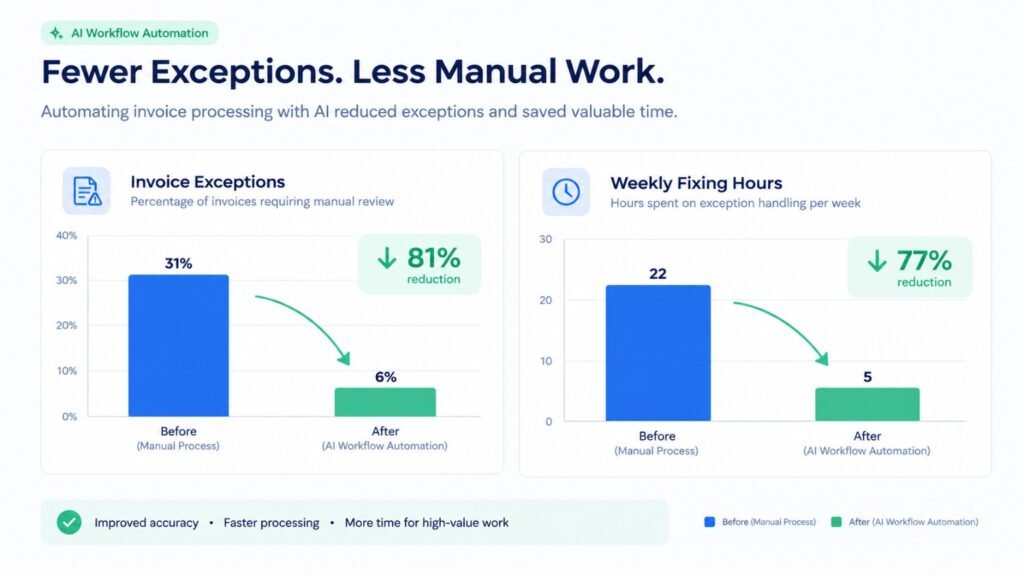
A US distribution company came to us with a rule-based bot. It processed about 1,800 supplier invoices every month.The bot worked until vendors changed their invoice layouts. Then it failed quietly. The finance team spent roughly 22 hours a week fixing exceptions.
About 31% of invoices needed manual cleanup.We didn’t throw the bot away. We kept it for approved, standard vendors. Then we added an AI layer to read unfamiliar invoices, extract fields, and flag low-confidence results for human review.
The results after 10 weeks:
- Exceptions dropped from 31% to 6%
- Manual fixing fell from 22 hours to about 5 hours weekly
- Payback arrived in roughly four months
Lesson learned: The best answer was hybrid. We kept what worked and replaced only what broke.
Story 2: The Clinic Inbox That Never Slept;
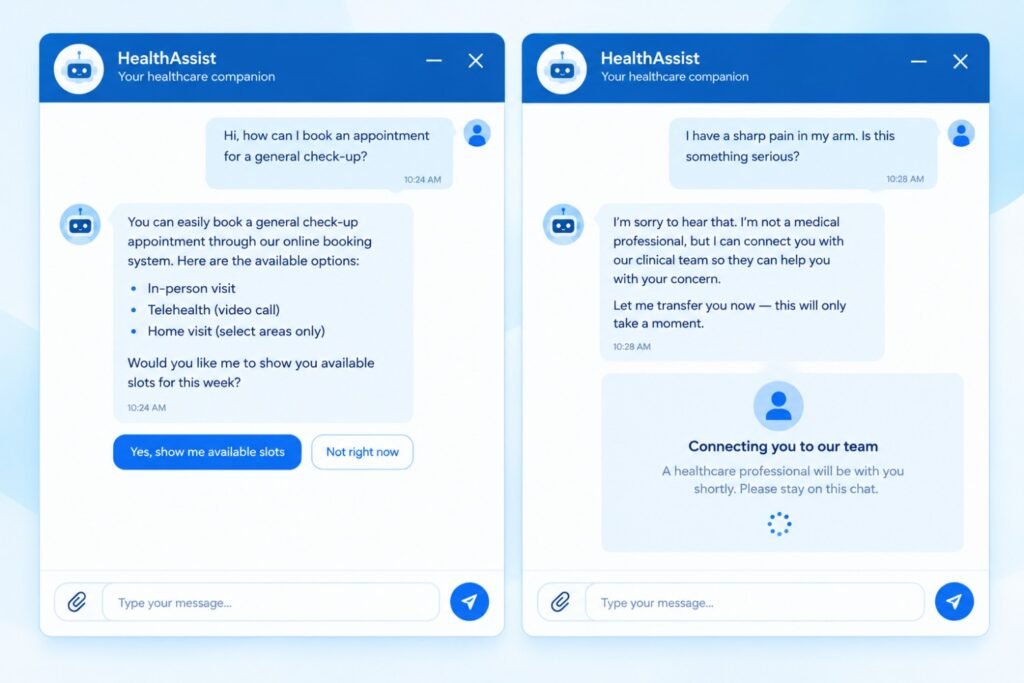
A multi-location health provider in the UK handled about 14,000 patient enquiries a month. Staff answered the same questions about bookings, opening hours, and forms again and again. We built an AI assistant to triage messages, answer routine questions, and escalate anything clinical to a human. We added strict privacy controls and clear handoff rules.
After 12 weeks:
- About 58% of routine enquiries were resolved without staff
- Average first-response time fell from 9 hours to under 2 minutes
- Front-desk staff regained around 35 hours per week
Mistake we made: Our first version tried to answer too much. It confused patients on edge cases. We narrowed its scope and added escalation rules. Satisfaction improved right away. If you work in healthcare, see how we approach AI solutions for healthcare businesses with compliance in mind.
What Are the Best Use Cases for AI Workflow Automation?
Here’s where we see the strongest returns across Zatiq Sol’s service lines.
AI Development
- Document processing, lead scoring, and smart approvals
- Custom AI agents that act across your tools
Custom Software Development
- Embedding AI features into existing platforms
- Automating internal tools, portals, and dashboards
Digital Marketing and SEO
- Content briefs, keyword clustering, and reporting
- Lead qualification and follow-up sequences
Mobile App Development
- In-app assistants, smart search, and personalization
UI/UX
- Conversational interfaces that feel natural, not robotic
IT Outsourcing
- AI-assisted ticket triage, monitoring, and QA
Want a practical starting point? Explore our AI-powered chatbot solutions. Chatbots are often the fastest first win.
How Do You Integrate AI in a Website?
Many readers search for how to integrate AI in a website. Here’s the simple version.
- Pick one job. Support, lead capture, search, or recommendations. Not all four.
- Choose your model and platform. Cloud AI platforms make this far easier today.
- Connect your data. Link your FAQs, product catalog, or knowledge base.
- Build the interface. Add a chat widget, smart search bar, or form assistant.
- Add guardrails. Limit topics, log conversations, and set escalation paths.
- Test with real users. Use 50 to 100 real queries before launch.
- Monitor and improve. Review failures weekly.
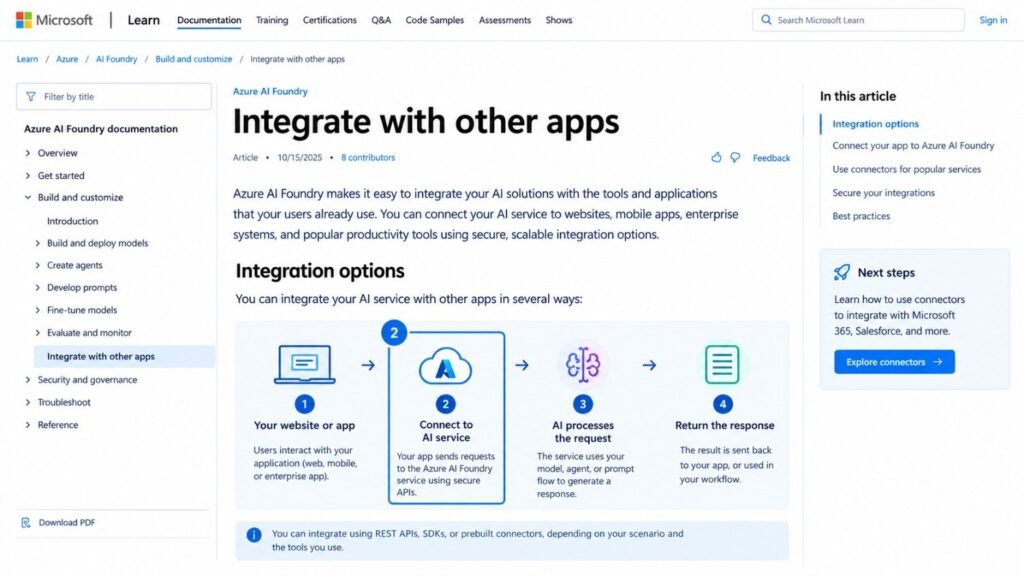
Microsoft’s documentation shows how teams can integrate Azure AI Foundry capabilities with other apps. It’s a useful technical reference for your developer.
Pro tip: Don’t start with a fancy interface. Start with clean answers. A plain chat box with accurate replies beats a beautiful one that guesses.Good UI/UX still matters, though. Clear buttons, visible handoff to humans, and honest “I’m an AI” labels build trust.
How Does AI Integration in Software Development Work?
AI integration in software development means adding intelligence to the products you build, and to the way you build them.
There are two layers.
Layer 1: AI inside the product.
- Smart search and recommendations
- Natural-language interfaces
- Automated classification and summaries
- Predictive alerts
Layer 2: AI inside the process.
- Code review assistance
- Test generation
- Documentation drafts
- Bug triage
The biggest challenge isn’t the model. It’s your existing systems.
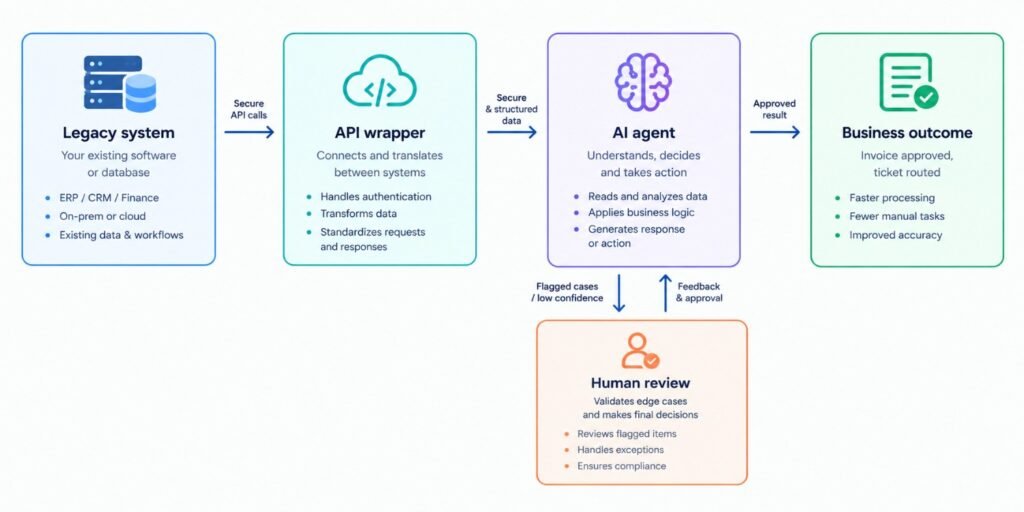
Most companies run older software that wasn’t designed for AI. AWS covers this well in its post on enabling AI agents to interact with existing applications. The core idea is to connect agents to what you already have, rather than rebuilding everything.
That’s our approach too. We wrap legacy systems with clean APIs, then let AI work on top. It’s faster, safer, and cheaper than a rewrite.
Which Service Includes AI Agent Integration?
A common question: which service includes AI agent integration? The answer depends on the provider. Look for these service types:
- AI development services that build custom agents
- Custom software development that embeds agents in your platform
- Cloud AI platforms that offer agent-building tools
- IT outsourcing partners who manage deployment and support
At Zatiq Sol, AI agent integration sits inside our AI development services. We design the agent, connect it to your systems, test it, and support it after launch. Before hiring any provider, ask five questions:
- Which systems will the agent connect to?
- What can the agent do on its own, and what needs approval?
- How do you log and audit its actions?
- How do you handle data privacy?
- What happens when the agent is wrong?
If the answers are vague, walk away.
What Mistakes Should You Avoid?
Our team has made some of these. Learn from them.
- Automating a broken process. AI will only make a bad process faster. Fix it first.
- Skipping human review. Start with “AI drafts, human approves.”
- Ignoring data quality. Messy data gives messy answers.
- Chasing every use case. Pick one workflow. Win it. Then expand.
- Measuring activity, not outcomes. Track hours saved, errors reduced, and revenue gained.
- Believing “agent washing.” Gartner notes many vendors rebrand chatbots and RPA as agentic AI. Ask for a live demo on your data.
Visibility matters too. If you automate content or lead capture, pair it with solid SEO so the results reach the right audience
How Do You Choose Between AI and Traditional Automation?
Use this quick checklist.
Choose traditional automation if:
- The process rarely changes
- Inputs are structured and clean
- Rules are simple and fully known
- You need perfect auditability
Choose AI workflow automation if:
- Inputs vary or arrive as text, PDFs, or voice
- Exceptions eat your team’s time
- Customers interact with the process
- Decisions need context, not just rules
Choose a hybrid if:
- Part of the process is stable and part is messy
- You want low risk and fast wins
- You already have bots that mostly work
In our project work, a hybrid setup is the most common winner. Keep the reliable rules. Add AI where variation hurts.
Best for Global Businesses: US, UK, Canada, and Australia Specific Considerations
The core principles work worldwide. But regulations, pricing, and expectations differ by region. Here’s what to watch.
United States
- Rules: There’s no single federal AI law. Sector rules apply, such as HIPAA in healthcare. State laws on automated decisions and privacy keep evolving.
- Challenge: Patchwork compliance across states.
- Opportunity: Strong demand in healthcare, logistics, and professional services.
- Typical budget: $10,000 – $60,000 for a first end-to-end workflow.
United Kingdom
- Rules: UK GDPR and the Data Protection Act govern personal data. Automated decision-making carries specific rights.
- Challenge: Clear consent and explainability, especially in health and finance.
- Typical budget: roughly £8,000 – £48,000 for a similar first project.
Canada
- Rules: PIPEDA applies federally. Quebec’s Law 25 adds stricter privacy duties.
- Challenge: Bilingual customer experiences and data residency questions.
- Typical budget: roughly C$14,000 – C$85,000.
Australia
- Rules: The Privacy Act and the Australian Privacy Principles apply. Privacy reforms continue to tighten expectations.
- Challenge: Smaller teams and distance from vendors, so support hours matter.
- Typical budget: roughly A$15,000 – A$90,000.
Currency figures are approximate conversions. Check current exchange rates and local tax before budgeting.
Illustrative success pattern: A small Canadian services firm automates client onboarding with AI document reading and a bilingual assistant. They keep humans on every approval step. That design satisfies privacy expectations and cuts onboarding time sharply.
Pro tip for all four regions: Document what data the AI sees, where it’s stored, and who can review it. Regulators and enterprise buyers increasingly ask.
Conclusion: So, Which Is Better for Your Business?
Here’s the straight answer.
AI workflow automation is better when work is messy, variable, or customer-facing. Traditional automation is better when work is stable, simple, and rule-bound.
For most businesses in 2026, the smartest move is hybrid. Keep what works. Add AI where exceptions hurt.
Remember the three lessons from this guide:
- Redesign the workflow, don’t just bolt AI onto it.
- Start small. One painful process. Clear metrics.
- Keep humans in the loop until the system earns trust.
Do that, and you’ll avoid the mistakes behind those canceled projects.
FAQ’s
What is AI workflow automation in simple terms?
It’s software that uses AI to run business tasks that need understanding, not just rules. It can read documents, answer questions, make bounded decisions, and trigger actions across your tools.
Is AI workflow automation better than RPA?
Not always. RPA is great for fixed, screen-based tasks. AI workflow automation handles variation and unstructured data. Many companies combine both for the best results.
How much does AI workflow automation cost for a small business?
Most small businesses spend roughly $5,000 to $25,000 for a first project, plus monthly running costs. Scope, data quality, and integrations drive the final price.
How long does it take to implement AI workflow automation?
A focused first workflow usually takes 6 to 12 weeks. That includes mapping the process, building, testing, and training your team. Larger multi-system projects take longer.
Can AI automation integrate with my existing software?
Yes. Most modern solutions connect through APIs or wrappers around older systems. A good partner will audit your stack first and avoid unnecessary rebuilds.
Ready to grow your business with custom AI, SEO, web development, or digital marketing? 👇 Most modern solutions connect through APIs or wrappers around older systems. A good partner will audit your stack first and avoid unnecessary rebuilds.