

To train chatbot on your own data, you don’t need to retrain an AI model. You clean your website content and documents, organize them into a searchable knowledge base, and set clear rules for how the bot answers. Then you test answers against real questions and refresh the content on a schedule. Most small businesses can launch a reliable bot in two to four weeks.
What Does It Mean to Train a Chatbot on Your Own Data?
Most people hear “training” and picture a huge machine learning project. That picture is outdated.
Today, to train chatbot on your own data usually means giving a language model access to your knowledge. The model doesn’t memorize it. It looks it up at the moment someone asks a question.
Think of it like an open-book exam. The AI is smart, but your documents are the textbook.
Here is what “your own data” can include:
- Website pages, blog posts, and service descriptions
- PDFs, brochures, and product manuals
- Help center articles and FAQs
- Internal policies and onboarding guides
- Past support tickets and chat transcripts
- Pricing sheets and terms of service
When you build an AI chatbot with a custom knowledge base, you control what the bot knows. You also control what it refuses to answer. That control is the real value.
If you want a broader view of chatbot types first, read our guide to AI-powered chatbot solutions.
Why Should You Build an AI Chatbot With a Custom Knowledge Base in 2027?
Generic chatbots guess. Custom ones know your business.
A general model has never read your refund policy. It doesn’t know your shipping times or your pricing tiers. So it makes things up, and customers notice.
A bot trained on your content fixes that. Here is what you gain:
- Accurate answers drawn from your approved sources
- Lower support load, since repetitive questions get handled instantly
- 24/7 coverage across time zones
- Consistent brand voice in every reply
- Faster lead qualification while visitors are still on your site
Two things have changed in 2027. Models read far longer inputs than before, and the tools for building knowledge bases have matured. You no longer need a research team. You need clean content and a sound process.
The process matters more than the model. A mediocre model with great data beats a great model with messy data.
How Do You Prepare Website Content and Documents for a Chatbot?
This step decides your success. Skip it and your bot will confidently repeat outdated or contradictory information.
Step 1: Audit What You Already Have
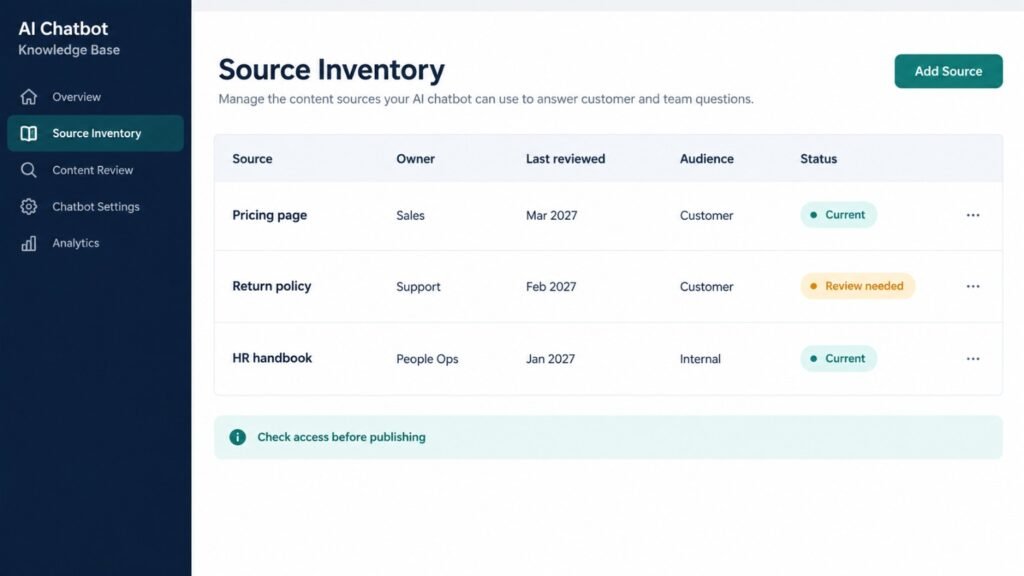
Start with a simple spreadsheet. List every source your bot might need. Add columns for owner, last updated date, and priority.
Ask these questions for each source:
- Is it accurate today?
- Does it contradict another document?
- Is it safe for public customers to see?
- Who owns it?
Delete or flag anything outdated. A bot can’t tell which of two pricing pages is correct. You have to decide.
Step 2: Collect Website Content Cleanly
Don’t just scrape raw HTML. Navigation menus, cookie banners, and footers pollute your data. The bot will treat them as if they were answers.
Extract the main body text only. Keep the page title, headings, and URL. The URL lets your bot cite its source later.
Pages worth including:
- Service and product pages
- Pricing and plan pages
- About and contact pages
- Blog posts that answer common questions
- Policy pages (returns, privacy, shipping)
Step 3: Convert Documents Into Clean Text
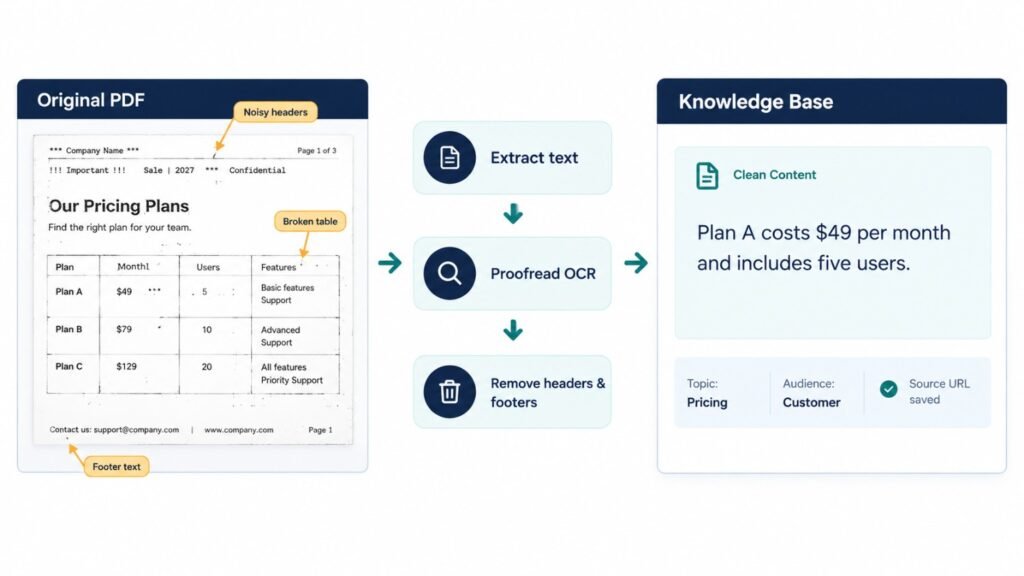
PDFs are tricky. Tables, columns, and scanned images often break during extraction.
Follow these rules:
- Use OCR for scanned files, then proofread the output
- Rebuild tables as plain sentences or structured lists
- Remove headers, footers, and page numbers
- Keep section headings intact
- Convert slides into short written summaries
A table that reads “Plan A | $49 | 5 users” often turns into gibberish. Rewrite it as “Plan A costs $49 per month and includes five users.”
Step 4: Rewrite Content in Question-and-Answer Form
This is the trick most guides skip. Customers ask questions. Your documents often state facts in corporate language.
Add Q&A pairs for your top 50 questions. Pull them from support tickets, sales calls, and search console queries.
Example:
- Q: How long does onboarding take?
- A: Onboarding takes five to seven business days for standard accounts.
Short, direct answers work beautifully. Our FAQ page follows this exact pattern.
Step 5: Break Content Into Focused Sections
Long pages hide answers. Split each document into short, focused sections of 300 to 600 words. Split along natural boundaries like headings, not mid-sentence.
Sections that are too big bury the answer in noise. Sections that are too small lose context. Test and adjust, because the first attempt is never perfect.
Step 6: Add Metadata
Tag each document with useful labels:
- Topic (billing, setup, security)
- Audience (customer, partner, internal)
- Last reviewed date
- Source URL
- Language
Metadata lets the bot filter results. A customer should never see an internal HR policy. Tags prevent that.
How Does a Chatbot Find the Right Answer in Your Data?
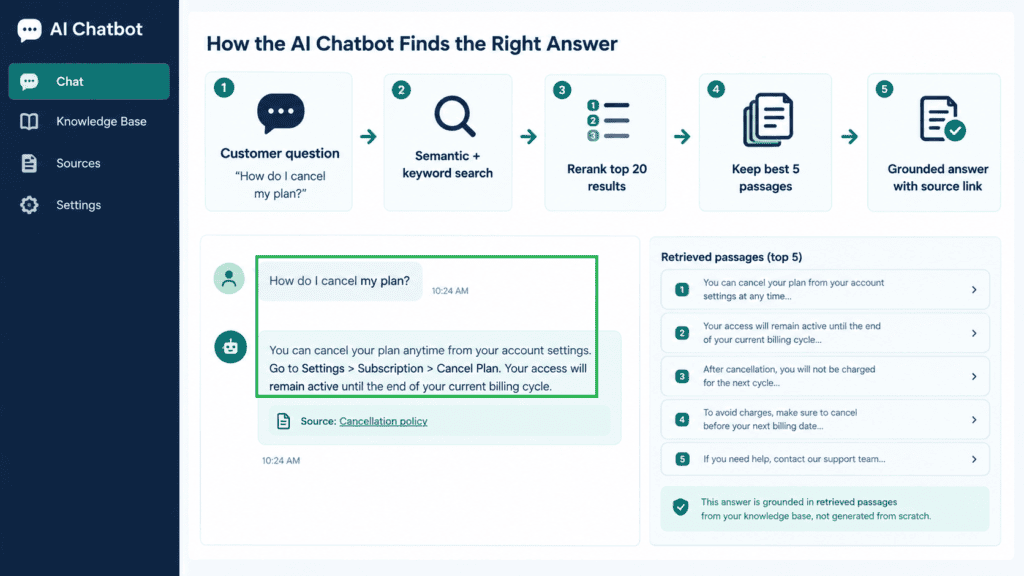
Your bot doesn’t answer from memory. It first searches your knowledge base, finds the most relevant passages, and then writes a reply using only those passages.
The best setups in 2027 combine two search methods:
- Semantic search finds meaning (“cancel my plan” matches “terminate subscription”)
- Keyword search finds exact terms (product codes, names, error numbers)
Add a reranker on top. It re-scores the top 20 results and keeps the best five. This single step often lifts accuracy noticeably.
Which Approach Is Best: No-Code, Custom-Built, or Fine-Tuning?
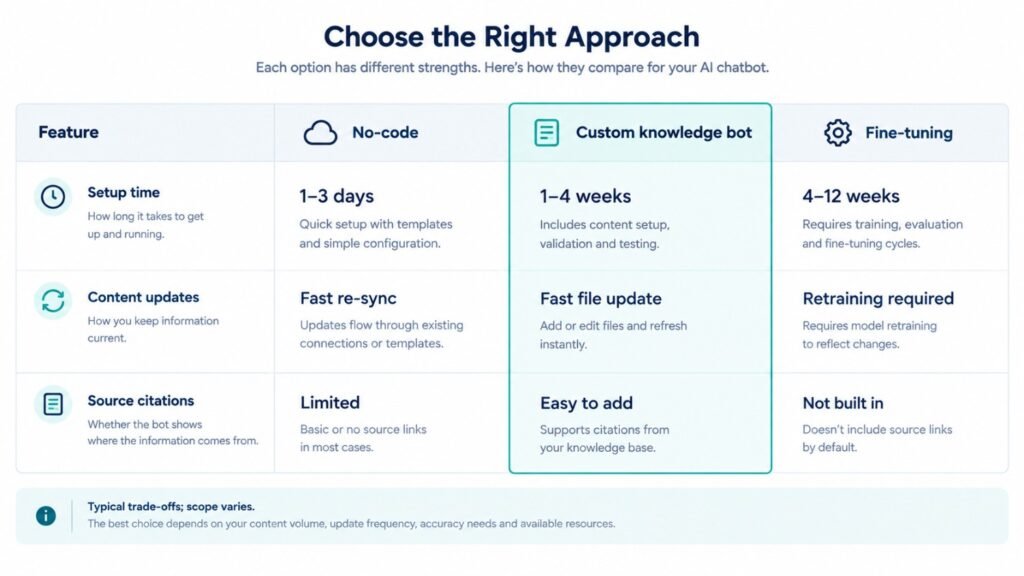
People often ask this. Here is an honest comparison.
| Factor | No-Code Platform | Custom-Built Knowledge Bot | Fine-Tuning |
|---|---|---|---|
| Best for | Small sites, simple FAQs | Facts, policies, product info, integrations | Tone, style, specialized formats |
| Setup time | 1 to 3 days | 1 to 4 weeks | 4 to 12 weeks |
| Update speed | Fast (re-sync content) | Fast (update the file) | Slow (retrain required) |
| Cost to launch | Very low | Low to medium | Medium to high |
| Source citations | Limited | Yes, easy to add | No |
| Hallucination risk | Medium | Low when grounded | Medium |
| Scales to large data | Limited | Yes | Yes, but costly |
| Technical skill needed | Low | Moderate | High |
My honest take: start with a custom knowledge base. It handles most business use cases. Add fine-tuning later only if you need a very specific voice or output format.
How Do You Train a Chatbot on Your Own Data, Step by Step?
Here is the full workflow in order. Use it as a checklist.
Step 1: Define the Chatbot’s Job
Decide what the bot should do. Support? Sales? Booking? Internal help?
Write a one-sentence mission. Example: “Answer pre-sales questions about our services and book discovery calls.” A narrow job produces a better bot. A bot that tries to do everything does nothing well
Step 2: Set Boundaries
List what the bot must never do:
- Give legal or medical advice
- Quote prices not in your documents
- Promise delivery dates
- Discuss competitors
Write a fallback line too. For example: “I don’t have that information. Let me connect you with our team.”
Step 3: Prepare Your Content
Complete the six preparation steps from the earlier section. Do not rush this part.
Step 4: Choose Your Tech Stack
You need five components:
- A language model (hosted API or private deployment)
- An embedding model to understand meaning
- A vector database to store your content
- An orchestration layer to connect everything
- A chat interface (web widget, WhatsApp, app, or Slack)
You can use no-code platforms for simple needs. For complex workflows, integrations, or strict security, custom development is wiser. Our AI development services cover both paths.
Step 5: Build the Knowledge Base
Load your cleaned content into the system. Store it with metadata. Do a quick sanity check by searching for ten known facts.
Step 6: Write the System Prompt
The system prompt is your bot’s rulebook. A strong one includes:
- Role: “You are a helpful assistant for [Company].”
- Grounding rule: “Answer only from the provided context.”
- Fallback: “If the answer isn’t there, say so.”
- Tone: “Friendly, clear, concise.”
- Format: “Use short paragraphs and cite sources.”
Step 7: Connect and Pilot
Launch to a small group first. Use internal staff or a few trusted customers. Collect every wrong or weak answer.
Step 8: Test, Fix, Repeat
This loop never truly ends. The next section shows how to run it properly.
How Do You Test Chatbot Answer Accuracy?
Many teams launch and hope. Don’t. Testing is what separates a demo from a dependable product.
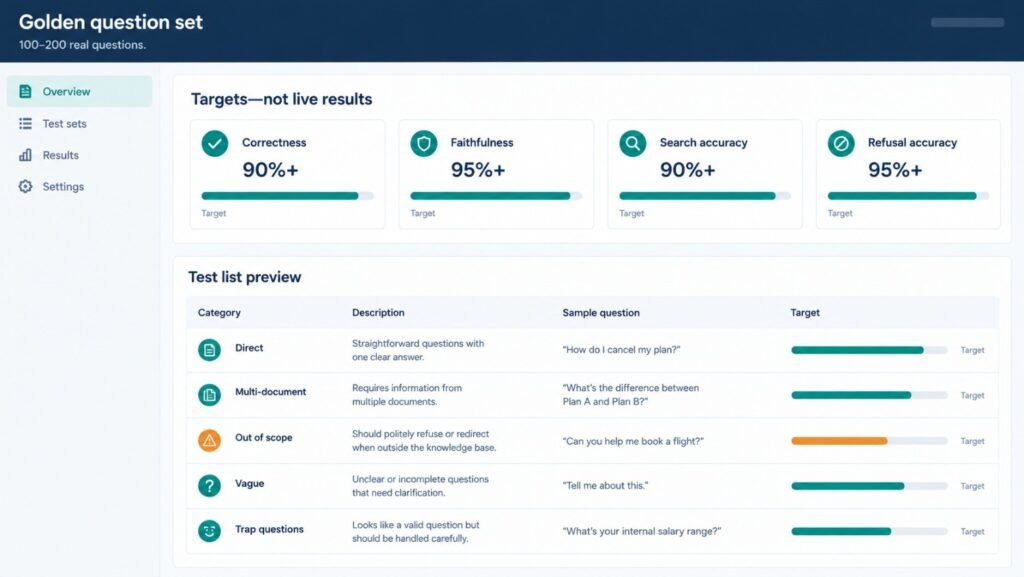
Build a Golden Question Set
Create 100 to 200 real questions with approved answers. Include:
- Easy questions with direct answers
- Tricky questions that need multiple documents
- Out-of-scope questions the bot should decline
- Misspelled or vague questions
- Trap questions where a wrong answer sounds plausible
Run this set every time you change something. It’s your regression test.
Score on Four Metrics
| Metric | What It Checks | Target |
|---|---|---|
| Correctness | Is the answer factually right? | 90%+ |
| Faithfulness | Does it stick to your sources? | 95%+ |
| Search accuracy | Did it find the right passage? | 90%+ |
| Refusal accuracy | Does it decline unknowns? | 95%+ |
Search problems and answer-writing problems look the same to users. Separate them. If the right passage was never found, fix your content sections or search. If it was found but misused, fix your prompt.
Use Human Review Plus Automated Checks
Automated “LLM-as-judge” scoring is fast and useful. But it isn’t perfect. Have a subject-matter expert review a sample of 30 to 50 answers each month.
Watch Live Conversations
After launch, track these signals:
- Thumbs-down rates
- Escalations to humans
- Questions with no good match
- Repeated rephrasing by the same user
Those unanswered questions are gold. They tell you exactly which content to write next.
A Story From Our Own Testing
Personal experience #1. A few months ago, we built a support bot for a mid-sized online retailer. Their knowledge base had roughly 400 pages. The first test run was embarrassing. On our 150-question golden set, the bot scored only 71 percent correct.
We dug into the failures. Nearly half came from two contradicting return-policy pages, one from 2023 and one from 2025. The bot kept mixing them.
We deleted the old page, rewrote the policy as 12 clear Q&A pairs, and cut section length from 900 to 450 words. Accuracy jumped to 93 percent in four days. Support tickets about returns dropped by about 38 percent in the first month.
The lesson was simple. The model wasn’t the problem. Our data was.
How Do You Keep Chatbot Information Updated?
A chatbot is a living product. Outdated answers destroy trust faster than no bot at all.
Assign a Content Owner
Every document needs a named human owner. When the pricing changes, someone must be responsible for updating the bot.
Automate Re-Indexing
Set up pipelines that detect changes:
- Website: re-crawl key pages weekly, or trigger on publish
- Documents: watch shared folders for new versions
- Help center: sync through API on update
Use incremental updates. Only refresh changed pages. It’s cheaper and faster.
Version and Expire Content
Add “valid until” or “review by” dates in your metadata. When a date passes, the document gets flagged automatically. Seasonal offers and promotions need this most.
Run a Monthly Maintenance Routine
Here is a simple rhythm:
- Review the top 20 unanswered questions
- Add or fix content for each gap
- Re-run the golden question set
- Check accuracy scores against last month
- Archive outdated documents
- Document what changed
Another Story From Practice
Personal experience #2. One SaaS client updated their pricing in March but forgot to tell the bot team. For nine days, the chatbot quoted old prices to prospects. Their sales team caught it only after three confused demo calls.
We fixed it by connecting their pricing page to an automatic re-index trigger. We also added a rule that any change to the pricing page sends an alert to the bot owner. That was eight months ago, and we have not seen a pricing mismatch since.
Small automations like this prevent big embarrassments.
How Much Does It Cost to Build an AI Chatbot With a Custom Knowledge Base?
Costs vary widely. Here are typical 2027 ranges for planning. Real quotes depend on your scope, integrations, and security needs.
| Tier | What You Get | Typical One-Time Cost | Monthly Running Cost |
|---|---|---|---|
| Starter | No-code bot, website and FAQ content, basic widget | $1,000 – $4,000 | $50 – $300 |
| Professional | Custom knowledge pipeline, hybrid search, CRM integration, analytics | $5,000 – $20,000 | $300 – $1,500 |
| Enterprise | Multi-channel, role-based access, private hosting, audit logs | $25,000 – $100,000+ | $1,500 – $8,000+ |
Running costs include model usage, vector database hosting, monitoring, and content maintenance. For a deeper breakdown, see our AI development services cost guide for 2027.
What Are the Pros and Cons of Training a Chatbot on Your Own Data?
Honesty builds trust, so here is the full picture.
| Pros | Cons |
|---|---|
| Answers match your real policies and pricing | Needs clean, well-organized source content |
| Citations make answers verifiable | Poor data produces poor answers |
| Updates are fast, with no retraining | Ongoing maintenance is required |
| Lower hallucination risk than generic bots | Search tuning takes testing time |
| Scales across languages and channels | Sensitive data needs careful security design |
| Reduces repetitive support work | Won’t replace humans for complex cases |
The cons are manageable. Almost all of them trace back to planning and process, not technology.
What Are Real-World Use Cases for a Custom-Knowledge Chatbot?
Here is how businesses apply this across different service areas. These mirror the work we do at Zatiq Sol.
AI Development
A logistics firm wanted staff to query shipping rules and customs documents in plain English. We built an internal assistant over 2,000 PDFs. Employees now find answers in seconds, not hours.
SEO and Content
Your chatbot’s unanswered questions reveal content gaps. Feed them into your editorial calendar. Each unanswered query is a keyword idea with proven demand. Content that fixes those gaps tends to rank because it matches real intent.
Custom Software Development
SaaS companies embed a knowledge bot directly inside their dashboards. It answers “how do I export this report?” based on live product docs. Users get help without leaving the app.
Digital Marketing
A lead-qualifying bot asks smart questions, answers pricing queries, and books calls. It captures contact details and passes warm leads to sales with a conversation summary.
Mobile App Development
In-app assistants guide users through onboarding. They can answer from your help content and trigger app actions, such as opening a settings screen.
UI/UX Design
Good bot design matters as much as good data. Clear greeting messages, quick-reply buttons, visible source links, and an easy “talk to a human” option all improve satisfaction. Poor UX makes even accurate bots feel frustrating.
IT Outsourcing
Many teams lack in-house AI skills. Outsourcing the build, testing, and maintenance gives you a working bot without hiring a full AI team. You keep ownership of your data and content.
What Mistakes Should You Avoid When Training a Chatbot on Your Data?
I’ve seen these repeatedly:
- Uploading everything. More data isn’t better. Relevant, clean data is better.
- Skipping the golden question set. You can’t improve what you don’t measure.
- Ignoring access control. Customers should never retrieve internal documents.
- Letting the bot guess. Always enforce a fallback response.
- Forgetting human handoff. Frustrated users need a path to a real person.
- Launching without an owner. Unowned bots decay in weeks.
- Treating launch as the finish line. Launch is the starting line.
Best for the USA: Specific Considerations
If you serve American customers, a few local factors matter.
Privacy and Compliance
The US has no single federal privacy law. Instead, you face a patchwork:
- State laws such as California’s CCPA/CPRA, plus growing laws in Virginia, Colorado, Texas, and others
- HIPAA if your bot touches protected health information
- TCPA rules if your bot sends SMS messages
- FTC guidance on deceptive claims and AI transparency
- ADA accessibility expectations for web chat widgets
State AI regulations are still evolving. Check current requirements with a qualified attorney before launch.
Practical tips:
- Disclose clearly that users are talking to an AI
- Avoid feeding personal data into your knowledge base
- Add a privacy notice inside the chat window
- Log consent where required
- Ask vendors about SOC 2 compliance
Pricing in US Dollars
American businesses should plan roughly:
- Small business bot: $2,000 – $6,000 to launch, $100 – $400 monthly
- Mid-market custom knowledge bot: $8,000 – $25,000 to launch, $500 – $2,000 monthly
- Regulated industry (healthcare, finance): $30,000+ with compliance work
Labor costs for US-based AI developers are high. Many American companies reduce costs by working with experienced offshore partners.
Local Challenges
- High customer expectations. Americans expect instant, accurate answers.
- Channel diversity. Web chat, SMS, and social messaging all matter.
- Competitive markets. Faster response times can become a real edge.
- Language needs. Spanish support is valuable in many states.
A US Success Pattern
A home services company in Texas used a knowledge-based chatbot for quote requests and scheduling. It answered service-area questions, explained pricing ranges, and booked appointments after hours. After-hours leads were no longer lost. The company reported a clear lift in booked jobs within the first quarter. The takeaway is that US customers reward speed. A bot that answers at 10 PM often wins the job.
Conclusion
To train chatbot on your own data, focus on process, not magic. Clean your content. Organize it into focused sections. Set clear rules for the bot. Test with a golden question set. Then maintain it every month.
Whether you want to build AI chatbot with custom knowledge base features for support, sales, or internal teams, the winning formula is the same. Good data, clear boundaries, constant testing.
Start small. Pick one use case. Prepare your top 50 questions this week. Launch a pilot, learn from real conversations, and expand.
A bot grounded in your own knowledge doesn’t just answer questions. It builds trust while you sleep.
How do you train a chatbot on your own data?
To train a chatbot on your own data, collect and clean your website content, PDFs, FAQs, and support documents. Organize them into a searchable knowledge base, set clear instructions for the chatbot, and test its answers against real customer questions. Update the knowledge base regularly to maintain accuracy.
Can I train an AI chatbot without coding?
Yes, you can train an AI chatbot without coding by using a no-code chatbot platform that supports custom knowledge bases. Upload your documents, connect your website content, configure the chatbot’s instructions, and test its responses before publishing it.
What data do I need to train a custom AI chatbot?
You can use website pages, blog posts, product descriptions, PDFs, help center articles, FAQs, pricing documents, and customer support transcripts. Make sure the information is accurate, up to date, and safe to share with customers before adding it to your chatbot’s knowledge base.
How much does it cost to build an AI chatbot with custom data?
The cost depends on the chatbot’s complexity, integrations, security requirements, and maintenance needs. A basic no-code chatbot may cost less than a custom-built solution with CRM integrations, advanced search, and analytics. Consider both the initial development cost and ongoing monthly expenses.
How do I prevent my AI chatbot from giving incorrect answers?
Use a clean, regularly updated knowledge base and instruct the chatbot to answer only from approved sources. Add a fallback response for questions it cannot answer, test it with real and challenging questions, and review incorrect responses regularly. Provide an option to connect users with a human support representative when necessary.
Ready to grow your business with custom AI, SEO, web development, or digital marketing? 👇